Print-on-Demand Physical Products for SaaS Founders
Print-on-demand physical products let a software company ship real objects without owning a machine, holding inventory, or committing to a production run. You supply one 3D model, and a print farm manufactures each unit only after someone has asked for it — one at a time, if that is what the week calls for. On our farm in Austin that means $0.12 per gram of PLA all-in, a $1.00 minimum per part, $7 flat US shipping that goes free over $50, and parts in a customer's hands 24 to 48 hours after the order lands. Here is what actually works, what it really costs, and where it fits in a SaaS product.
Why a Software Company Ships Atoms
Every channel you own is a rectangle competing with forty other rectangles. Email, in-app banners, push, retargeting — all of it lands in the same attention budget, and all of it is one swipe from gone. A physical object is not in that competition. It sits on a desk. It gets picked up. It is the only thing you can send a customer that their coworkers will ask about unprompted.
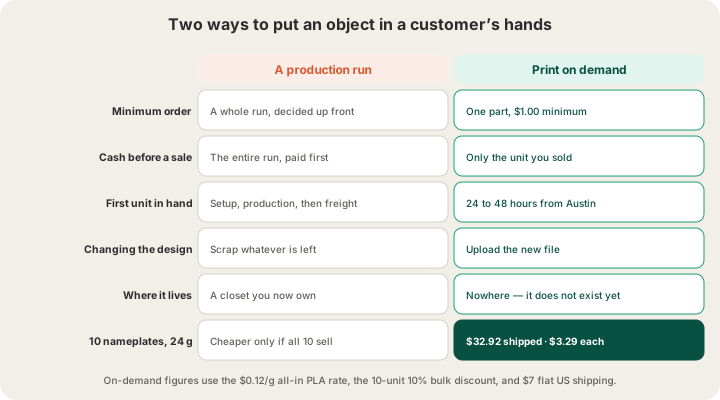
The reason more software companies did not do this is not that they never thought of it. It is that the old path started with a minimum order quantity. You picked a design, guessed how many you would need, paid for all of them before a single one had a home, and then owned a closet. The guess was the product. Print on demand removes the guess entirely: quantity one is a real, priced, shippable option, so the design decision and the volume decision stop being the same decision.
That inversion is the same one that makes a print farm work for anyone selling physical goods without a warehouse — we walked through the general version in /blog/3d-printing-for-small-business. The SaaS-specific version is more interesting, because software companies already have the two things this model needs: a list of customers with addresses, and an event stream that knows when something worth celebrating just happened.
What Actually Works as a Printed Product
The failure mode here is printing a logo on a thing nobody wanted. The objects that survive on a desk are the ones that do a small job. A few categories that hold up:
- Milestone objects. The customer hit 1,000,000 API calls, shipped their hundredth deploy, or finished a two-year migration. A small trophy with the number on it is the only artifact that survives the Slack thread.
- Onboarding desk pieces. A cable clip, a phone stand, a badge holder — something with your mark on it that earns its place by being useful eight hours a day.
- Conference leave-behinds that are not paper. A solid object survives a flight home in a way that a folded card does not, and it gets kept because throwing away an object feels different from throwing away a page.
- Real accessories for hardware-adjacent products. If your software talks to a sensor, a camera, a printer, or a rack, somebody is currently mounting it with tape. A bracket is a product feature.
- Customer-configured objects your own app generates. Parametric geometry driven by the customer's own data — a plotted curve, a floor plan, a name — is a product that competitors cannot copy by buying the same catalogue item.
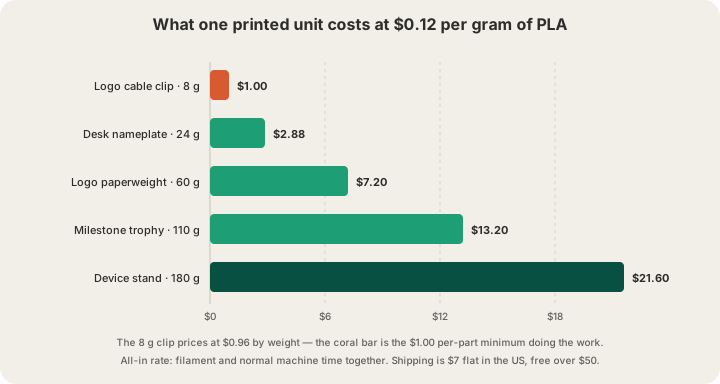
| Object | Typical PLA weight | Printed cost | Where it goes |
|---|---|---|---|
| Logo cable clip | 8 g | $1.00 | Onboarding envelope, conference table |
| Desk nameplate | 24 g | $2.88 | New hires, new logos, welcome kits |
| Logo paperweight | 60 g | $7.20 | Leave-behind that survives the flight |
| Milestone trophy | 110 g | $13.20 | Annual awards, usage milestones |
| Device stand or enclosure | 180 g | $21.60 | A real accessory, sold or bundled |
The Unit Economics, With the Boring Parts Included
Per-gram pricing is easy to quote and easy to mis-budget, because the two line items people forget are shipping and the bulk break. Here is the same 24-gram nameplate at five order sizes, with $7 flat US shipping, free over $50, and our bulk discounts of 5% at 5 units and 10% at 10.
| Units | Parts | Bulk discount | Shipping | Total | Per unit |
|---|---|---|---|---|---|
| 1 | $2.88 | — | $7.00 | $9.88 | $9.88 |
| 5 | $14.40 | −5% ($0.72) | $7.00 | $20.68 | $4.14 |
| 10 | $28.80 | −10% ($2.88) | $7.00 | $32.92 | $3.29 |
| 50 | $144.00 | −10% ($14.40) | Free (over $50) | $129.60 | $2.59 |
| 250 | $720.00 | −10% ($72.00) | Free | $648.00 | $2.59 |
Read the last column carefully, because it is the whole argument. The per-unit price stops improving at 50. Between 50 and 250 units nothing changes — you have already collected every discount the model offers. There is no volume tier waiting at 1,000 that justifies ordering 950 more than you need, which is exactly the pressure a production run applies. The full rate card lives at /pricing, and /blog/how-much-does-custom-3d-printing-cost breaks down what actually drives the gram count in the first place.
One option pushes the number up, and it is worth knowing before you design. Premium 0.1 mm layers price at 1.75× the standard rate, which turns the $2.88 nameplate into $5.04 — worth it for fine lettering or a face, wasted on a cable clip. Colour does not move the number at all: a model we slice prints in the single filament you choose, at the single-colour price, whatever colours it carries on screen. A genuinely multi-colour part means painting and slicing the plate yourself and uploading the sliced .gcode.3mf, which is then priced from its own measured grams and hours — every colour change purges 84 mm³ of plastic into that weight, so keep changes to the layers that actually need them. /blog/multi-color-printing-waste-purge-towers explains where the purge goes and how to design around it.
Getting a Model Without Hiring a Modeler
Three routes, in increasing order of how much of your team it involves. The first is the AI generator at /design: describe the object, get a print-ready mesh back, iterate on the prompt until it is right. The second is paying a contractor once for a parametric source file you own, which pays off the moment you want the same object in five sizes. The third — the one most SaaS teams eventually land on — is generating geometry from code, with something like OpenSCAD or CadQuery driven by your own data, so the object is a build artifact rather than an asset in a folder.
Whichever route you take, the file format matters. We accept STL, GLB, 3MF, and sliced G-code (.gcode or .gcode.3mf), with a 100 MB limit on meshes and 40 MB on sliced files. 3MF is the one to prefer if your tool can write it, because it carries units and colour assignments that STL simply does not have. /blog/what-file-do-i-need-to-3d-print walks through the tradeoffs if you are picking an export target for a pipeline you will maintain.
The Constraints That Actually Bite
- Build volume is 340 × 320 × 340 mm on the Bambu H2S. That is larger than most people expect and still smaller than the trophy someone will inevitably design. Check the bounding box before the design review, not after.
- Weight is your bill, so hollow anything chunky. A solid 60 mm cube is an expensive paperweight; the same cube with sensible walls and low infill costs a fraction and feels identical in the hand.
- Colour is one filament unless you slice the plate yourself. A model we slice prints in the single colour you pick; a multi-colour part means painting and slicing it in Bambu Studio or OrcaSlicer and sending the sliced file. The AMS holds four trays, so four colours is the practical ceiling, and every change costs purge and time.
- Small raised text is where budget designs fail. Under about 1 mm of relief, a logo reads as a smudge. Emboss it or cut it deep enough to catch light.
- Everything is FDM, which means visible layer lines. That is a look, not a defect — but decide whether you want it before you send a hundred of them out.
Wiring It Into the Product
The part that makes this a SaaS play rather than a swag budget is that pricing is a pure function, so your own backend can ask what something costs before a human is involved. Our quoting endpoint takes a bounding box, a material, a quality, and a quantity, and returns grams, print hours, and the full breakdown:
curl -X POST https://x3dstudios.com/api/price \
  -H "Content-Type: application/json" \
  -d '{
    "bboxMm": { "x": 120, "y": 80, "z": 60 },
    "material": "pla",
    "quality": "standard",
    "quantity": 1
  }'

# Response
{
  "grams": 320,
  "printHours": 15.84,
  "materialCost": 38.4,
  "machineCost": 0,
  "perUnit": 38.4,
  "subtotal": 38.4,
  "shipping": 7,
  "total": 45.4,
  "currency": "USD"
}
That is enough to build the interesting half of the loop today: a job in your queue notices a customer crossed a milestone, prices the object, and drops an approval into the channel where someone confirms the address. Programmatic ordering — the part that turns approval into a printed part with no human step at all — is the farm API, currently in early access at /farm. The generate and price endpoints are documented at /api-docs and sit in private beta, with keys issued on request.
A Realistic First Run
- Pick one object under 30 grams. The cheap ones are where you learn, and at $4 or less per unit the learning is nearly free.
- Get a model — generate one from a text prompt, or export STL or 3MF from whatever your team already uses.
- Upload it for a real sliced quote, in grams and hours rather than an estimate.
- Order exactly one. Hold it. Almost every first design has one detail that is wrong in the hand and looked fine on screen.
- Fix that detail, then order ten and take the 10% bulk break. Ten is enough to hand out and find out whether people keep them.
- Only after that, wire it into a trigger in your product. Automating a thing nobody wanted just makes more of it.
The whole first loop is a weekend, not a quarter, because nothing in it waits on a quote request or a tooling decision. If you are in Austin, pickup is free and the loop is shorter still.
FAQ
How much does a print-on-demand physical product cost per unit?
Weight decides it. PLA is $0.12 per gram all-in — filament and normal machine time together — with a $1.00 minimum per part. A 24-gram desk nameplate is $2.88 printed; ten of them are $32.92 shipped, or $3.29 each after the 10% bulk discount and $7 flat US shipping.
What is the minimum order for print-on-demand 3D printing?
One part, at a $1.00 minimum. There is no setup fee, no tooling charge, and no minimum order quantity, which is the entire reason this model works for a software company that does not know yet how many it needs.
Can my app order physical products automatically?
Quoting is already an API call: POST a bounding box, material, quality, and quantity and get grams, hours, and the total back. Fully programmatic ordering is the farm API, which is in early access and open to request. The generate and price endpoints are in private beta today, with keys issued on request.
How long until a customer is holding it?
Most orders print in 24 to 48 hours in Austin, then ship. The order moves through five stages you can watch — placed, printed, packed, shipped, delivered — and the shipped email carries the tracking number. Austin customers can skip shipping entirely and pick up.
Ready to get started?
Upload a 3D model for instant pricing, or generate one with AI.