3D Print Farm Setup: Scaling Past One Printer
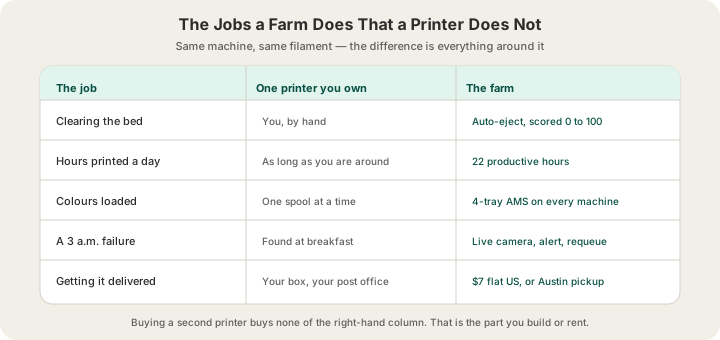
The gap between one 3D printer and a 3D print farm setup is not the number of machines — it is everything that has to exist between them. A single printer gives you roughly 484 grams of finished plastic a day if it never stops, and it stops constantly, because someone has to clear the bed. A farm is the same hardware wrapped in scheduling, filament tracking, automatic plate clearing, live monitoring and shipping. Buying a second printer buys you none of that, which is why the second printer is where most people discover scaling is a software and logistics problem wearing a hardware costume.
One Printer Is a Tool, a 3D Print Farm Setup Is a System
One printer is genuinely excellent at what it does. You slice a part, you start it, you come back, you take it off. The loop closes because you are standing in it. Every step that feels free — deciding which job to run, noticing a failure, knowing which colour is loaded, boxing the result — is free because you are doing it with attention you had spare. /docs/farm/overview describes the machines and which steps are a person rather than a program.
Add machines and that attention stops scaling with you. A farm, as What Is a 3D Print Farm? How Ours Runs in Austin puts it, is a fleet run as one manufacturing system rather than a pile of tools. Two printers is fine. Four is a spreadsheet. Ten is a job. The work does not grow linearly with machine count either, because the coordination cost grows faster than the printing does: at ten machines you are not printing ten times as much, you are answering ten times as many questions about what to print next and what went wrong on machine six.
What One Printer Actually Produces in a Day
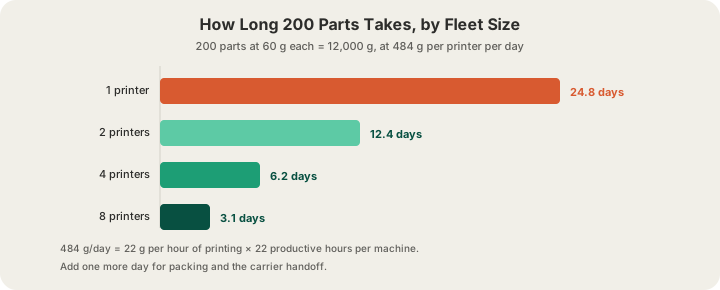
Throughput on an FDM machine is best measured in grams per hour, because grams are what you are selling and what you are paying for. We plan our fleet at 22 grams per hour of printing and 22 productive hours per machine per day, which is 484 grams a day. The two missing hours are changeover and maintenance headroom, and we budget about 12 minutes to clear a bed and start the next job.
That 22-hour figure is the number a home printer cannot match, and not because the machine is worse. A printer on your desk gets the hours you are awake and willing to restart it. Call that eight to ten hours of actual printing on a good day, which is closer to 200 grams — under half of what the same hardware does when something clears the plate at 2 a.m. The machine was never the constraint. The bed being occupied was.
| Fleet | Grams/day | 60 g parts/day | 12,000 g job |
|---|---|---|---|
| 1 printer, attended ~10 h | 220 | 3.7 | 54.5 days |
| 1 printer, 22 h unattended | 484 | 8.1 | 24.8 days |
| 2 printers, unattended | 968 | 16.1 | 12.4 days |
| 4 printers, unattended | 1,936 | 32.3 | 6.2 days |
| 8 printers, unattended | 3,872 | 64.5 | 3.1 days |
The Five Things That Break When You Add Printers
Every one of these is invisible on machine one and unavoidable by machine five.
- Scheduling. With one printer the queue is your memory. With several you need something that knows which machine is free, which is mid-job, which is waiting on filament and which is down, and can pack incoming work onto plates without a person deciding each time.
- Filament state. The most annoying failure in a fleet is a perfectly good print in the wrong colour. Our queue asks which filament as an explicit step for every job, not just multi-colour ones. Each machine carries a four-tray AMS, so four colours run untouched and a fifth is a scheduling decision.
- Failure detection. One printer fails in front of you. Ten fail at 3 a.m. Every machine on our floor streams a live camera and reports Bambu's own HMS fault codes, which get turned into operator work items rather than a light blinking in an empty room.
- Bed clearing. This is the one nobody plans for and the one that eats the most capacity. Automatic plate ejection is what makes the 22-hour day possible, and it is scored per plate rather than assumed — 3D Printing Automation: Auto-Eject and Lights-Out Printing covers the five checks a part has to pass.
- Getting parts to people. Boxing, labelling, tracking and the carrier handoff is a full day of the lead time and the step that scales worst by hand. It is also the part that has nothing to do with 3D printing, which is why it surprises people.
Notice what is not on that list: print quality. A well-tuned desktop machine and a farm machine put down the same plastic. Scaling does not improve your parts, it improves your throughput and your failure recovery. If your problem is that parts come out wrong rather than slowly, more printers is the wrong purchase — 3D Print Failures: 8 Slicing Mistakes That Cause Them is a cheaper fix.
The Money, Honestly
A desktop printer is $300 to $2,000, and that is the number people compare against a per-part price. It is the wrong comparison, because the machine is the cheapest part of owning one. The real ledger is filament you buy in whole spools whether you use them or not, power, the failures you eat, the hours you spend clearing beds and boxing parts, and the fact that a broken machine is a stopped business rather than one printer of a fleet going quiet.
Against that, a farm price is one number. PLA is $0.12 per gram all-in — filament and normal machine time together — with a $1.00 minimum per part and billable weight rounded up to the whole gram. Premium 0.1 mm layers price at 1.75× the standard rate. Shipping is $7 flat in the US and free over $49.50, or $15 express. Bulk pricing drops 5% at five units and 10% at ten.
| Order | Farm price | Ships in | On one printer |
|---|---|---|---|
| 1 part, 60 g PLA | $7.20 + $7 shipping | 4–5 business days | Same day, if you own one |
| 10 parts, 600 g | $64.80, free shipping | 4–5 business days | ~1.2 days of nonstop printing |
| 50 parts, 3,000 g | $324.00, free shipping | Days | ~6.2 days nonstop |
| 200 parts, 12,000 g | $1,296.00, free shipping | Days | ~24.8 days nonstop |
The 10 and 50 unit rows include the 10% bulk discount; the 200-unit row does too. What the right-hand column does not show is that "nonstop" is doing enormous work in a household. Twenty-five days of nonstop printing is not twenty-five days — it is closer to two months of you restarting a machine every evening, and one bad spool or one clogged nozzle puts a week back on the estimate. Our own ship window already includes packing and handoff: normal print ships in 4–5 business days, or 1–2 with Priority print (10% of the items, at least $10). How Much Does 3D Printing Cost? Custom Prints in 2026 breaks the per-part maths down further.
When One Printer Is Still the Right Answer
Owning wins in three situations, and they are all about iteration speed rather than volume. If you are prototyping and want to change something twenty times in a weekend, shipping is the bottleneck and a machine on your desk removes it. If you print constantly in small amounts — organisers, replacements, one-off fixes — the machine amortises through sheer use. And if the tinkering is the point, none of this analysis applies and it should not.
There is also a middle option people miss. You can reserve a machine on our farm rather than buying one — your jobs queue on your printer instead of competing with the general fleet, you watch it on a camera, and finished plates clear themselves so it is not idle overnight. That is described at /farm, and it is the closest thing to owning a printer that does not involve owning a printer.
When to Hand It Over
Hand it over when the printing stops being the interesting part. Concretely: when you have a deadline a single machine cannot physically meet, when you need dozens of identical parts and consistency matters more than control, when you need a material or a size your printer cannot do, or when you have started scheduling your evenings around bed clearing. The 340 × 320 × 340 mm build volume on the H2S is a real practical difference too — plenty of models that need splitting on a desktop machine fit whole on ours.
Uploading is the same either way: STL or 3MF (a sliced plate as .gcode.3mf) at /print, up to 100 MB for meshes and 40 MB for already-sliced files. OBJ is not accepted, so convert first. The quote comes from a real OrcaSlicer slice of your actual model rather than a volume estimate, which is why it matches the invoice.
FAQ
How many printers do you need to start a 3D print farm?
Automation is the real threshold, not machine count. Ten printers with job scheduling, filament tracking and automatic plate clearing is a farm. Fifty printers run by hand is fifty printers and a very tired person. If nothing clears the bed without you, you have a room full of tools rather than a production system.
Is it cheaper to buy a 3D printer or use a print farm?
It depends entirely on how many grams you will actually print. A machine is $300 to $2,000 up front plus filament, power, failures and your hours; a farm is $0.12 per gram of PLA all-in with a $1.00 minimum and $7 flat US shipping. If you print a few hundred grams a month, ordering is cheaper and far less work. If you print continuously and enjoy the process, owning wins.
How much can one 3D printer produce in a day?
About 484 grams if it runs 22 hours at 22 grams per hour, which requires something to clear the plate between jobs. Attended at home, expect roughly 200 to 250 grams a day. In 60 g parts, that is the difference between eight a day and under four.
Can I use a farm without changing my files?
Yes, with one exception. STL and 3MF (a sliced plate as .gcode.3mf) all upload directly, so whatever your slicer already exports usually works as-is. OBJ is the exception and needs converting to STL first. If you want to control settings exactly, upload your own sliced plate as .gcode.3mf and the farm prints it as you sliced it, after a safety validation pass.
Ready to get started?
Upload a 3D model for instant pricing, or generate one with AI.