3D Printing Automation: Auto-Eject and Lights-Out Printing
Auto-eject is the piece of 3D printing automation that lets a printer clear its own build plate: the bed cools, the finished part is pushed off the front, and the next job in the queue starts with nobody in the room. Lights-out printing is what that buys — an automated print farm that keeps producing from Friday evening to Monday morning instead of stopping when the last person goes home. It is not a switch you flip blindly. On our Austin floor every finished plate is scored from 0 to 100 against five safety checks, and anything under 70 stays exactly where it is until a human lifts it off.
What Lights-Out 3D Printing Automation Requires
A 3D printer is already good at running unattended for eight hours. What it is bad at is hour nine. The print finishes, the machine sits there holding a cold part on a plate, and it stays idle until somebody walks over and pops the part off. On a single machine that gap is an annoyance. Across a fleet it is the single biggest source of lost capacity, because the idle window is exactly the window nobody is watching: overnight, weekends, the three hours between shifts. /docs/farm/overview describes the machines and which steps are a person rather than a program.
So the useful definition of lights-out printing is not "the printer runs while you sleep". It is "the printer finishes, resets itself, and starts the next thing while you sleep". That needs three capabilities working together: a queue that already knows what comes next, a way to clear the plate without hands, and a rule for deciding when clearing the plate without hands is a bad idea.
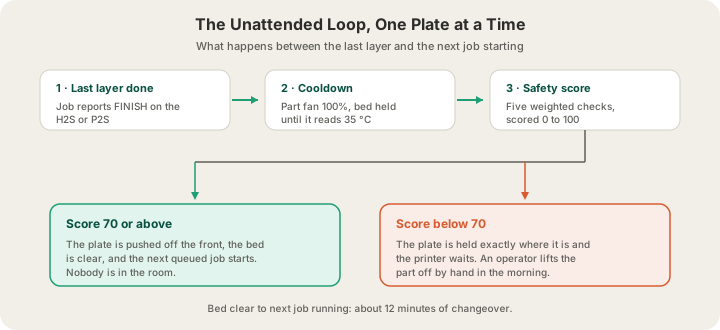
We budget 12 minutes of changeover between jobs and 22 productive hours per printer per day. The remaining two hours are deliberate headroom for maintenance, nozzle changes and the plates that auto-eject correctly refuses to touch. If you want the wider picture of how a job gets from an upload to a machine, 3D Printing Process: What Happens After You Click Print walks the whole pipeline; this post is about one step in it.
The Five Checks Behind Every Auto-Eject
Before a plate is allowed to eject itself, the sliced file is analysed and five properties are scored. Each carries a weight, the weights sum to 100, and the plate needs 70 to clear on its own. The weights are not arbitrary — they are ranked by how expensive the failure is if the check is wrong.
| Check | Limit | Weight | What it is really asking |
|---|---|---|---|
| Print height | 100 mm or under | 30 | Will this topple instead of sliding? |
| Material | PLA only | 20 | Does it release from a cold plate at all? |
| Footprint | 20–150 cm² | 20 | Too small to push, or big enough to jam? |
| Aspect ratio | 3.0 or under | 15 | Is it tall and thin relative to its base? |
| Bed temperature | 75 °C or under | 15 | Can the plate be cooled to a release point? |
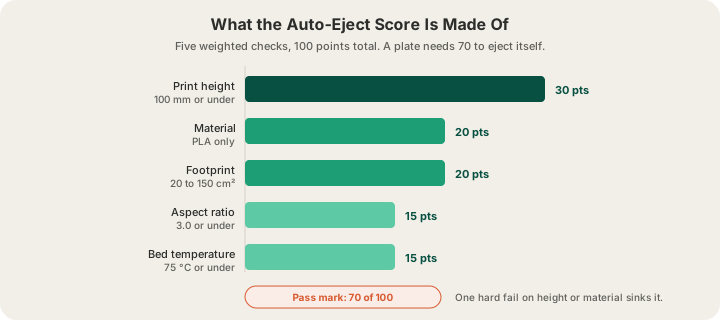
Height is worth 30 points on its own, and it is scored on a slope rather than as a yes/no: a 30 mm part scores near the top of the band, a 95 mm part scrapes through, and anything past 120 mm fails outright. The reason is simple physics. Ejection is a horizontal shove at the base of the part. A short, wide object slides. A tall, narrow object pivots at the front edge and goes over, and a part that lands on its face has to be reprinted, which costs more than the hour of idle time the automation was saving.
Aspect ratio catches the shapes that height alone misses. It is the part's height divided by the square root of its footprint, so a 90 mm tower on a 25 cm² base fails on balance even though it passed on height. Footprint has limits at both ends: under about 20 cm² there is not enough contact area to push against reliably, and over 150 cm² a large flat part can wedge against the frame instead of clearing it.
Cooling Comes Before Anything Else
A finished print is not a collectable print. Parts release from a PEI plate because the bed contracts as it cools — pull one while it is warm and you either cannot get it off or you deform it on the way. So the moment a job reports FINISH, the machine runs a cooldown before it does anything else: the part fan goes to full, the exhaust runs where there is one, and the job stays in a cooling state until the temperature sensors actually agree.
| Material | Bed must reach | Chamber | Part fan |
|---|---|---|---|
| PLA, PETG, TPU | 35 °C | n/a | 100% |
| ABS, ASA | 45 °C | 40 °C | 60% |
| PA / Nylon | 50 °C | 45 °C | 50% |
| PC | 50 °C | 45 °C | 40% |
The fan speeds fall as the materials get hotter, which looks backwards until you have cracked a thick ABS part by chilling one face of it. High-temperature materials want the chamber exhaust to do the work slowly rather than a part fan doing it fast. PLA has no such problem, which is another reason it is the material auto-eject is qualified for: it is already close to a release temperature when the last layer lands.
What Still Wakes Somebody Up
Automation earns its keep by being honest about its limits. These are the cases that deliberately stop the loop and put a job in front of an operator instead:
- A score under 70. The plate is held, the printer stops taking new work, and the job appears on the operator's requests list. Nothing is thrown away and nothing is guessed at.
- A printer fault. Bambu's own HMS codes are read straight off the machine and turned into work items. A fault has to be absent for five minutes before its alert is retired, because printers clear their fault list at the start of every print and a one-tick absence proves nothing.
- A failure caught on camera. Every printer streams, so a detachment at 3 a.m. is visible rather than discovered at 8 a.m., and the job can be requeued the same night instead of the next morning.
- A filament change the queue did not plan. Each machine carries a four-tray AMS, so most colour work runs untouched; a fifth colour is a scheduling decision rather than a surprise discovered at midnight.
- Anything that did not pass G-code safety validation. Sliced uploads are screened for commands that would disable endstops, rewrite PID values or redefine the home position before a machine is allowed to run them.
That last one matters more for lights-out printing than for anything else, because an unattended machine has no one to hit stop. A G-code file is a list of commands rather than a shape, and the safety check is the difference between accepting a sliced file from a customer and accepting arbitrary instructions for a 250 °C heater. A file that fails the screen never reaches a printer at all.
Why Any of This Shows Up on Your Invoice
Unattended changeover is the reason a small part can cost what it costs. Our PLA rate is $0.12 per gram all-in — filament and normal machine time together — with a $1.00 minimum per part and billable weight rounded up to the whole gram. That single number only works if machine hours are cheap, and machine hours are only cheap if machines are not sitting overnight holding a finished part nobody has collected. Shipping is $7 flat anywhere in the US, free over $49.50, or $15 express.
It also explains the lead time. Normal print ships in 4–5 business days and Priority print in 1–2, and the overnight window is a real part of that budget rather than dead time we hope to make up during the day. When you upload at /print, the quote you see comes from a real OrcaSlicer slice of your model — actual grams and actual hours — not a volume estimate, so the number already reflects how the job will really run. How Long Does 3D Printing Take? Real Times From a Print Farm breaks the timeline down further.
None of this is something you have to configure. You do not choose an eject mode at checkout, and there is no cheaper tier for parts that happen to qualify. The scoring runs on our side, and the only thing you would notice is that a 40 mm desk hook and a 250 mm vase have quietly taken different routes through the building. If you want a machine reserved for your own queue rather than sharing the general fleet, that lives at /farm and is described in What Is Remote 3D Printing? Reserve a Printer Online.
FAQ
What is auto-eject in 3D printing?
Auto-eject is automatic build plate clearing: after a print finishes and the bed cools, the machine pushes the part off the plate so the next queued job can start without a person present. It is what turns a printer that runs unattended into a printer that runs continuously, and it is the core requirement for lights-out operation.
Is unattended 3D printing safe?
It is as safe as the checks around it. Modern printers have thermal runaway protection and refuse to extrude below temperature, but the real risks in a farm are procedural: an unvalidated G-code file, an unnoticed failure, or a part ejected when it should not have been. We screen sliced files for dangerous commands, stream every printer to a camera, and score every plate before it clears itself. Is 3D Printing Safe? Fumes, Materials, and Food Contact covers the material and fume side of the question.
Which prints do not qualify for auto-eject?
Anything over 100 mm tall, anything in a material other than PLA, footprints outside roughly 20 to 150 cm², parts more than three times as tall as their base is wide, and anything needing a bed hotter than 75 °C. Those plates are not rejected — they are printed normally and cleared by an operator, which costs a little lead time and nothing at all in quality.
Do I need to do anything differently when I order?
No. Upload STL or 3MF (a sliced plate as .gcode.3mf) at /print and the scoring happens behind the scenes. Note that OBJ is not accepted, so convert to STL first. The only design-side lever worth knowing is that short, wide, PLA parts move through the farm with the least human handling, which is a nudge rather than a rule.
Ready to get started?
Upload a 3D model for instant pricing, or generate one with AI.