Generative Design + Print API
Generative design plus a print API is a closed loop: software produces candidate geometry, an endpoint prices each candidate, and a print farm manufactures the one you choose — no CAD seat, no quote email, and nobody standing between the design and the object. The loop only works because print farm pricing is deterministic. At $0.12 per gram of PLA all-in with a $1.00 minimum per part, a script can rank fifty variants on cost before it commits to any of them, then have the winner in its hands in 24 to 48 hours. This guide covers what generative design means in practice, the calls that make up the loop, and the constraints worth teaching your generator before it invents something the machine cannot build.
What Generative Design Actually Means Here
The phrase covers three fairly different techniques, and which one you are using determines how much repair work sits between the output and a printable file. Lumping them together is how teams end up surprised when the mesh their pipeline produced will not slice.
| Approach | Where the geometry comes from | Typical output | Print-readiness risk |
|---|---|---|---|
| Parametric sweep | Your own code varying dimensions on a base model | Clean solids, STL or 3MF | Low — CAD kernels emit watertight meshes |
| Topology optimisation | A solver removing material under a load case | Dense organic mesh, often enormous | Medium — thin webs, unsupported overhangs |
| AI text- or image-to-3D | A generative model turning a prompt into a shape | GLB or STL from one sentence | Highest — usually needs repair first |
The third row is the one that changed recently, and it is what our generator at /design does: a prompt or a photo becomes a mesh, and the same pipeline reports whether that mesh is actually printable. If you want the mechanics of how text becomes geometry, /blog/how-text-to-3d-ai-works walks through the model side of it. What matters for this article is that all three approaches converge on the same problem — you now have far more candidate designs than you have patience to evaluate by hand.
The Loop, One Call at a Time
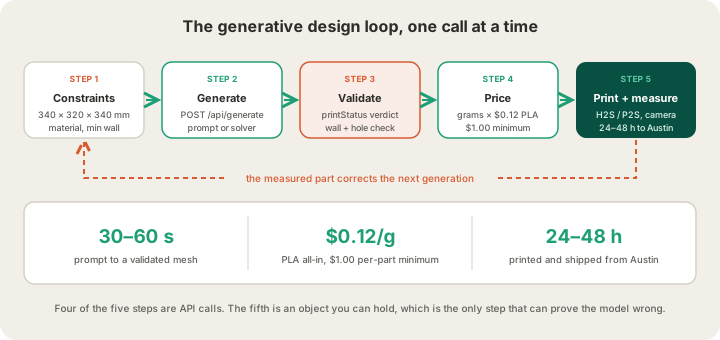
1. Generate, and read the printability verdict
Our /api/generate endpoint takes a prompt or an image and returns a model URL, but the field worth wiring into your logic is printStatus. It comes back as ready when the mesh was already sound, or repaired with a printDetail string saying what had to be fixed — filled holes, corrected normals, closed shells. A pipeline that ignores that field is a pipeline that will eventually submit a mesh with inverted normals and wonder why the slice looks hollow.
# 1 — generate a candidate
curl -X POST https://x3dstudios.com/api/generate \
  -H "Content-Type: application/json" \
  -d '{
    "prompt": "lightweight quadcopter arm, hollow, 180 mm",
    "mode": "hi_fi",
    "advanced": {
      "outputFormat": "stl",
      "hollowing": "hollow",
      "wallThicknessMm": 2.0
    }
  }'

# Response
{
  "modelUrl": "https://cdn.trimod.ai/<id>.stl",
  "taskId": "task_8a1c...",
  "printStatus": "repaired",
  "printDetail": "filled 3 holes · fixed normals"
}

# 2 — rough-price it from the bounding box
curl -X POST https://x3dstudios.com/api/price \
  -H "Content-Type: application/json" \
  -d '{
    "bboxMm": { "x": 180, "y": 40, "z": 22 },
    "material": "pla",
    "quality": "standard",
    "quantity": 1
  }'

# Response — an estimate, not a slice
{ "grams": 88, "perUnit": 10.56, "shipping": 7, "total": 17.56 }
2. Price it, and know which price you are looking at
That $10.56 is a bounding-box estimate, and for generated geometry it can be wildly wrong in either direction. A bounding box knows nothing about the lattice the solver just carved out, the 2 mm shell the generator added, or the solid boss you asked it to keep — it just assumes a generic part filling that box. When we ran a real slice on that same arm, the answer was 52 g and $6.24, roughly 40% below the estimate, because most of what the bounding box counted was air.
3. Print it, then measure the thing you printed
The step people skip is the one that makes the loop a loop. A generated part is a hypothesis about a physical object, and the only way to falsify it is to hold one. Prints run on our Bambu H2S and P2S machines in Austin with a 4-tray AMS, live cameras on every job, and G-code safety validation before anything reaches a hotend. Most orders come back in 24 to 48 hours — fast enough that the measurement feeds the next generation while you still remember what you were testing.
Cost Is the Cheapest Fitness Function You Have
Every generative process needs an objective, and most teams reach straight for simulated stiffness or a mass target. Weight-based pricing gives you a second objective for free, and it is one your finance side already understands: what does this candidate cost to actually exist? Because the rate is flat and all-in, cost is just weight, and weight is something you get out of a slice in seconds.
Here is a real sweep on one part — a quadcopter arm — from a solid baseline down to an aggressive topology-optimised version. PLA is 1.26 g/cm³, the rate is $0.12 per gram all-in, and billable weight rounds up to the whole gram.
| Candidate | How it was produced | Solid volume | PLA weight | Price |
|---|---|---|---|---|
| A | Hand-modelled solid baseline | 96 cm³ | 121 g | $14.52 |
| B | Parametric shell, 4 mm walls | 41 cm³ | 52 g | $6.24 |
| C | Shell plus 25% gyroid infill | 33 cm³ | 42 g | $5.04 |
| D | Topology solver, 30% volume fraction | 29 cm³ | 37 g | $4.44 |
| E | Topology solver, 15% volume fraction | 17 cm³ | 22 g | $2.64 |
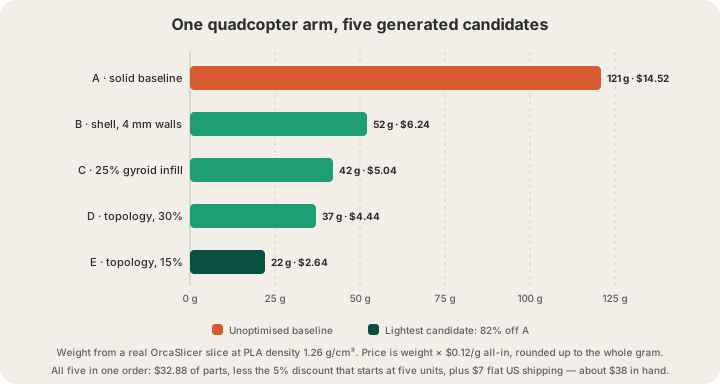
The useful move is to print the whole sweep rather than agonising over which candidate to commit to. Five parts in one order comes to $32.88, takes the 5% bulk discount that starts at five units, and adds $7 flat US shipping — roughly $38 to hold every option in your hand at once, or $31.24 if you collect it in Austin. That is cheaper than a single afternoon of arguing about which one to make.
Where Generated Geometry Breaks
Generators optimise for the objective you gave them, and printability is almost never in that objective. These are the failures that show up over and over in automated pipelines:
- Non-manifold and self-intersecting shells — the classic output of both AI generators and aggressive mesh booleans. A slicer cannot decide what is inside a surface that crosses itself.
- Webs thinner than the nozzle. A topology solver will happily produce a 0.3 mm strut because the maths says it carries load; the printer produces nothing at all there.
- Overhangs that need support everywhere. Organic optimised geometry is beautiful and, printed in the wrong orientation, half support material you paid for by the gram.
- Feature sizes below what FDM resolves. Fine surface detail that reads well on screen turns to mush at 0.2 mm layers, and dropping to 0.1 mm prices at 1.75× the base rate.
- Mesh files that are simply too large. Topology output routinely lands in the hundreds of megabytes; our limit is 100 MB for STL and GLB, so decimate before you submit.
Every model that goes through our pipeline gets a server-side mesh review before it can be ordered, and the reasoning behind that gate is in /blog/why-print-ready-matters-mesh-validation. Treat that check as part of your loop rather than a hurdle at the end: a candidate that fails validation should be scored as a failed candidate, not manually rescued.
Constraints Worth Baking Into the Generator
Most of the pain above disappears if the generator knows the machine's limits before it starts. These are ours, and they are all things you can express as bounds in a solver or as text in a prompt:
| Constraint | The limit | What it means for the generator |
|---|---|---|
| Build volume | 340 × 320 × 340 mm | Bigger candidates must be generated as an assembly |
| Accepted files | STL, GLB, 3MF, G-code | Ask for stl or 3mf — OBJ is not accepted |
| File size | 100 MB mesh, 40 MB sliced | Decimate solver output before submitting |
| Layer height | 0.2 mm standard, 0.1 mm at 1.75× | Fine detail silently picks the expensive tier |
| Colours per plate | 4-tray AMS | At most four materials in one job |
| Minimum billing | $1.00 per part, rounded up | Tiny candidates all cost the same |
Fit and clearance deserve their own pass. A generator has no idea that a 10 mm hole prints at 9.7 mm, so anything that has to mate with a bearing, a magnet or another printed part needs its tolerances set deliberately rather than nominally — /blog/3d-printing-tolerances-guide has the numbers we design to. And if your objective function needs to weigh materials against each other, the rates stay on the same per-gram basis: PLA $0.12, PETG $0.12, ASA $0.14, all-in.
Closing the Loop With Physical Feedback
What makes this genuinely different from CAD-with-extra-steps is that the feedback is physical and it is fast. A team iterating on a bracket used to wait a week per revision and therefore batched changes into big, cautious redesigns. When a revision costs $4.44 and two days, the sane strategy inverts: generate broadly, print several, and let the ones that break tell you where the model of the world was wrong.
That is the same argument behind treating manufacturing as an API at all, which we made in /blog/3d-printing-api-manufacturing-as-code. Generative design is what fills the pipe. One system that can produce a thousand candidates is only useful next to another system that can turn any of them into an object without a phone call, and the endpoint shapes for both live on /api-docs.
FAQ
What is generative design in 3D printing?
It is design where software produces the geometry from goals and constraints rather than a person drawing it. In practice that means one of three things: a parametric sweep over dimensions, a topology solver removing material under a load case, or an AI model turning a prompt or photo into a mesh. 3D printing is its natural partner because it can build the organic shapes solvers produce without tooling.
Can AI-generated 3D models be printed directly?
Sometimes, and you should never assume it. Generated meshes frequently arrive non-manifold, with inverted normals or walls too thin to extrude. Our generator returns a printStatus of ready or repaired with a note on what it fixed, and every model gets a server-side mesh review before it can be ordered. Read the verdict rather than trusting the render.
How do I price a generated variant before printing it?
Two ways, and they are not equivalent. A bounding-box quote through /api/price is instant and good enough for a live slider. A real OrcaSlicer slice of the actual mesh is the accurate one, and for lattices, shells and optimised geometry the gap between the two is large. Either way the arithmetic is the same: grams × $0.12 for PLA, rounded up, with a $1.00 minimum per part.
What file format should a generative pipeline output?
STL for single-material parts, 3MF when you need multiple bodies or colour assignments, GLB if the model is coming straight out of a generator. We accept all three plus sliced G-code. We do not accept OBJ, which is a common default export, so convert it inside your pipeline rather than at the point of ordering.
How many variants is it worth actually printing?
More than instinct suggests. Bulk pricing starts at five units with 5% off and ten units with 10% off, so the five-candidate sweep above came to about $38 including shipping. The expensive resource in generative design is not plastic, it is the weeks you spend deciding between candidates you never held.
Ready to get started?
Upload a 3D model for instant pricing, or generate one with AI.