Why 'Print-Ready' Matters: Watertight Meshes, Wall Thickness & Overhangs Explained
A 3D model can look flawless on screen and still be physically impossible to print. The gap between "renders nicely" and "survives a print bed" is where most first prints die — and it's entirely preventable. Here are the six properties that make a mesh print-ready, why each one matters, and how validation catches problems before they cost you time and filament.
Screens Forgive. Printers Don't.
A rendered model only needs surfaces that face the camera. A printed model needs to be a coherent solid: the slicer software converts your mesh into thousands of layer paths, and any geometric ambiguity — a hole, an overlapping shell, a paper-thin wall — forces it to guess. Slicers guess badly. The result is missing walls, spaghetti extrusion, or a print that fails four hours in.
This is the core problem with most AI 3D generators: they optimize for visual fidelity, because their primary market is games and rendering. Geometry that looks right is the goal; geometry that is right is incidental.
The Six Checks
1. Watertight (Zero Boundary Edges)
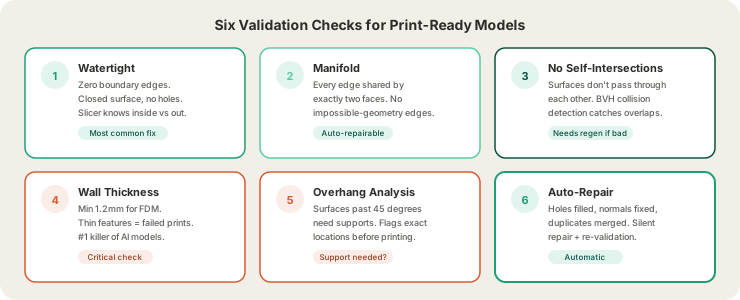
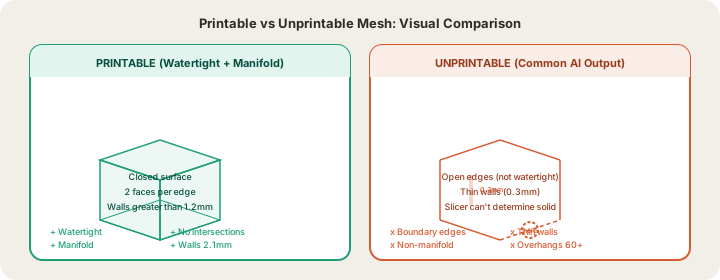
A printable mesh must be a closed surface — imagine filling it with water; none can leak. Every edge must connect exactly two faces. AI generators frequently leave micro-holes at complex intersections. A slicer hitting a hole can't tell inside from outside, and infill leaks into nothing.
2. Manifold Geometry
Non-manifold edges (shared by three or more faces) describe shapes that can't exist as physical solids — like two cubes sharing a single edge. Slicers handle them unpredictably.
3. No Self-Intersections
When a mesh's surfaces pass through each other (an arm clipping through a torso), the "solid" region becomes ambiguous. We detect these with BVH (bounding volume hierarchy) collision checks.
4. Minimum Wall Thickness
FDM printing has a physical floor: features thinner than the nozzle can't exist, and walls under ~1mm are fragile or fail entirely. We enforce 1.2mm minimum — comfortably FDM-safe. This is the most common killer of elegant AI-generated models: that delicate, beautiful fin renders perfectly and prints as nothing.
5. Overhang Analysis
Each layer prints on top of the previous one. Surfaces angled past ~45° from vertical are printing onto air and need support structures. Validation either confirms the model is self-supporting or flags exactly where supports are required — before you commit.
6. Auto-Repair
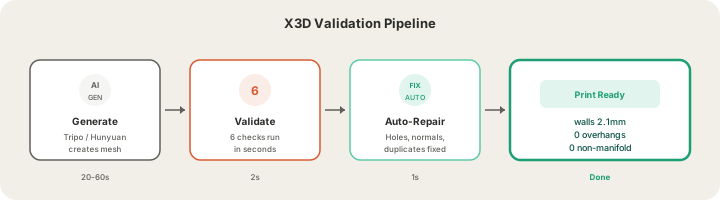
Many failures are mechanically fixable: holes can be filled, flipped normals corrected, duplicate vertices merged. Our pipeline (built on trimesh and libigl) repairs what it can silently and re-validates. You only see issues that genuinely need a regeneration.
What This Looks Like in Practice
Generate a model in the X3D Design Studio and the badge tells you the result of all six checks with real numbers: ✓ Print Ready — walls 2.1mm · 0 overhangs · 0 non-manifold edges. That badge is a guarantee, not a vibe — it means the file will slice cleanly on our farm or your home printer.
Uploading your own model to Print & Ship? The same validation suite runs on it before we quote, whether it came from Blender, a scanner, or another AI tool.
The DIY Alternative (And Why It's Fading)
Makers have traditionally repaired meshes by hand: Meshmixer or Blender for hole-filling, Netfabb for analysis, plus experience-honed judgment about wall thickness. It works — and costs 30–60 minutes per model and a learning curve measured in months.
Automated validation does it in seconds, every time, with measurements instead of eyeballing. The skill isn't disappearing; it's just no longer the price of admission.
| Method | Time | Accuracy | Learning Curve |
|---|---|---|---|
| Manual (Meshmixer/Blender) | 30–60 min | Depends on experience | Months |
| Desktop tools (Netfabb) | 5–10 min | Good for simple issues | Weeks |
| X3D auto-validation | < 5 seconds | All 6 checks, measured | None |
FAQ
What does "watertight" mean in 3D printing?
The mesh is a fully closed surface with no holes — every edge borders exactly two faces — so the slicer can unambiguously determine inside vs. outside.
How thick should 3D print walls be?
1.2mm minimum for FDM is a safe rule (3 perimeters at 0.4mm). Decorative parts can sometimes go thinner; structural parts should go thicker.
Can software fix any broken mesh?
No — repair handles holes, normals, and duplicates well, but a fundamentally ambiguous shape (heavy self-intersection, zero-thickness geometry) needs regeneration or remodeling. Validation tells you which case you're in.
Do STL files from marketplaces need validation too?
Yes. Marketplace files vary wildly in quality — run anything through a checker before printing. We validate every upload automatically.
Ready to get started?
Upload a 3D model for instant pricing, or generate one with AI.