How Text-to-3D AI Works: From Prompt to Printable Mesh
Text-to-3D AI works in four stages: a language model rewrites your prompt into a detailed geometric description, a generative model trained on millions of 3D objects synthesizes a 3D representation of it, a mesh-extraction step converts that representation into triangles, and a texturing pass adds surface color. Modern engines run the whole pipeline in 30–60 seconds. The catch: raw AI output is usually not printable, which is why production systems like ours add a fifth stage — automated mesh validation and repair.
The Pipeline, Stage by Stage
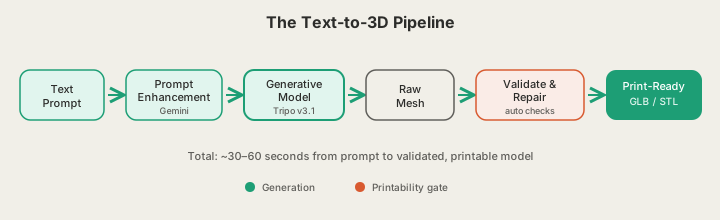
Stage 1: Prompt Enhancement
Your prompt is almost always too short for a generative model to work with. "A dragon" could be a figurine, a wall relief, or a chess piece. So the first stage runs your text through a language model that expands it into a structured description: object type, pose, style, proportions, level of detail. In our generator at x3dstudios.com/design, this step is Gemini-powered, and it does one extra thing — it injects print-oriented constraints like a flat base and a closed volume, so even vague prompts resolve into objects that can survive gravity.
Stage 2: The Generative Model
The enhanced prompt goes to the 3D generative model itself — in our case Tripo v3.1 — trained on millions of paired 3D assets and images. It does not search a library and retrieve a match. It synthesizes new geometry, typically as an implicit field or latent volume, the same way an image model synthesizes pixels: learned patterns of what dragons, lampshades, and low-poly foxes look like in three dimensions.
Stage 3: Mesh Extraction
Printers and game engines do not consume neural fields — they need triangles. A surface-extraction algorithm (marching cubes and its modern descendants) walks the learned representation and produces a polygon mesh, usually 30,000–300,000 triangles. This is where most geometric defects are born: extraction can leave microscopic gaps, duplicated faces, and slivers of geometry disconnected from the main body.
Stage 4: Texturing
A final pass projects color and material detail onto the surface, producing the textured GLB you spin around in the viewer. For screen use, that is the end of the pipeline. For printing, texture is mostly cosmetic — a single-color FDM printer ignores it entirely — and the real work is just beginning.
Why Raw AI Models Aren't Printable
An image with a flaw is still an image. A mesh with a flaw is a six-hour print failure. These defects show up constantly in raw generative output:
| Defect | What it is | What happens on the printer |
|---|---|---|
| Non-manifold geometry | Edges shared by 3+ faces, or by none | Slicer can't tell inside from outside |
| Thin shells | Walls under ~1.2mm | Sections don't extrude, or snap in hand |
| Floating islands | Fragments detached from the body | Printing in mid-air — spaghetti failure |
| Inverted normals | Faces pointing the wrong way | Solid regions sliced as voids |
| Open holes | Surface isn't watertight | Infill leaks, unpredictable geometry |
Hobbyists who download raw AI meshes discover this the hard way, spending evenings in Blender or mesh-repair tools closing holes and deleting stray shells by hand. The failure is invisible until the slicer chokes or the print collapses — which is exactly why validation has to be automated and mandatory, not an optional afterthought.
The Validation and Repair Step We Add
Every generation on our platform runs through mesh validation before you ever see it: watertightness, manifold edges, minimum wall thickness, disconnected components, normal orientation. Most defects are repaired automatically — holes filled, stray islands removed, normals flipped, thin regions flagged. If a mesh cannot be repaired, we tell you before you order, not after six hours of failed extrusion. That gap is the difference between a demo and a manufacturing pipeline.
What the AI Is Good At — and What It Isn't
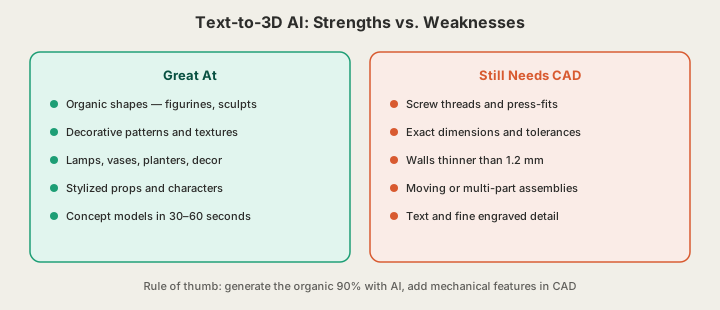
Generative models learn statistical patterns of shape, which makes them excellent at organic, decorative, and stylized geometry — and unreliable at anything requiring exact dimensions. A model can produce a beautiful dragon in 40 seconds but cannot produce an M8 thread that actually mates with a bolt, because threads are defined by specification, not by visual pattern.
Design Intent Tips
- Describe form, not function. "Spiral vase with vertical ribs" generates well; "vase that keeps flowers fresh" does not.
- Name the object type in the first three words — it anchors everything the model generates after.
- Use style anchors: low-poly, voronoi, art deco, geometric, organic. They steer aesthetics reliably.
- Keep mechanical interfaces out of the AI's hands. Generate the sculptural 90%, then add threads or exact holes in CAD, or design around off-the-shelf inserts.
- Think about gravity: a flat base and mass distributed low prints better and looks intentional.
A Short History: From 90 Minutes to 30 Seconds
In late 2022, Google's DreamFusion kicked off the field by optimizing a radiance field against a 2D image model — one object took around 90 minutes of GPU time and still wasn't a usable mesh. Through 2023, feed-forward approaches like OpenAI's Shap-E cut that to minutes, and commercial engines from Tripo and Meshy brought textured, exportable meshes to consumers. By 2025, sub-minute generation with clean topology became the norm. Today's engines — including the Tripo v3.1 pipeline behind our generator — deliver in 30–60 seconds what took an afternoon of compute three years ago.
Where Text-to-3D Is Going
Three directions matter for makers. First, part-aware generation: models that output assemblies with sensible seams instead of one fused blob. Second, printability-aware training, where wall thickness and overhang constraints are learned rather than repaired after the fact. Third — the one we are building toward — closing the loop with manufacturing, so a generated model flows straight into a print farm queue and arrives at your door without a human touching a slicer.
That last piece already works end to end on our platform: generate at x3dstudios.com/design, then either export the validated STL for your own printer or send it straight to our solar-powered farm, where Bambu Lab CoreXY machines print it and ship within 24–48 hours with inspection photos. The AI handles the geometry; the farm handles the atoms.
FAQ
Does text-to-3D AI copy existing models?
No — it synthesizes new geometry from learned patterns rather than retrieving files from a library. Two identical prompts produce two different meshes.
How long does text-to-3D generation take?
About 30–60 seconds on our platform, including prompt enhancement and mesh validation. In the 2022 DreamFusion era, a single object took around 90 minutes.
Can I 3D print an AI-generated model directly?
Only if it has been validated and repaired. Raw generative output commonly contains non-manifold edges, thin walls, and floating fragments that fail on a printer. Our pipeline runs those checks automatically and outputs print-ready STL or GLB.
Can I generate a 3D model from an image instead of text?
Yes — the same pipeline accepts a reference image in place of a prompt. The generative and validation stages are identical from there.
Ready to get started?
Upload a 3D model for instant pricing, or generate one with AI.