Text to STL: AI Prompt to a Real 3D Printed Object
Text to STL means typing a sentence — "modern geometric lampshade" — and getting back a validated, printable model, then holding the physical object in your hands a few days later. No CAD software, no 3D printer, no mesh repair. Here's exactly how the text-to-physical-object pipeline works, and how to write prompts that produce great prints.
The text to STL pipeline in three steps
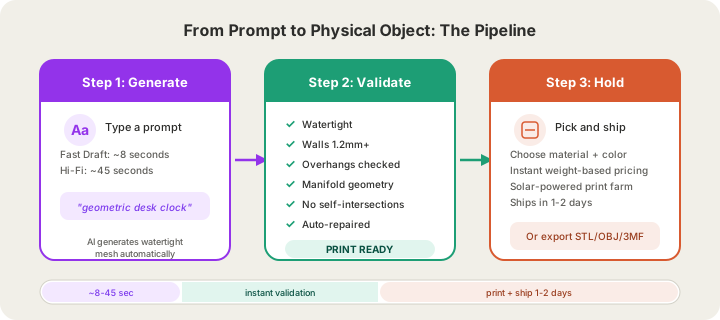
Step 1: Generate
In the X3D Design Studio, type a description of the object you want. Two modes are available:
- Fast Draft (about 20–30 seconds, 1 credit) — quick iterations while you explore ideas
- Hi-Fi (about 4–5 minutes) — final-quality geometry for the model you'll print
You can also drop in a reference image and generate from that. Behind the scenes, print-optimization parameters are appended to your prompt automatically — you describe what you want, the system handles how it prints. /docs/studio/design explains each generation mode, how long it takes and what it costs.
Step 2: Validate
This is the step most people don't know exists — and the reason most AI-generated models fail on a printer. Every model runs through six automated checks before you ever see it:
- Watertight — zero boundary edges
- Wall thickness — minimum 1.2mm (FDM-safe)
- Overhangs — under 45°, or flagged for supports
- Non-manifold edges — zero
- Self-intersections — zero
- Auto-repair — holes filled, normals fixed automatically
Step 3: Hold
Pick material, color, and finish in the same panel, see the price instantly (it's weight-based), and order. Your object prints on our farm in Austin, Texas: normal print ships in 4–5 business days, or 1–2 with Priority print ($5 at checkout). Prefer printing at home? Download STL, OBJ or 3MF.
How to write prompts that print well
After watching thousands of generations, these patterns produce the best physical objects:
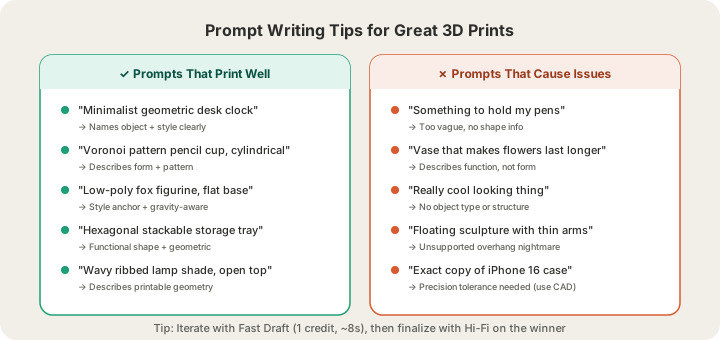
- Name the object type first. "Desk organizer with three compartments" beats "something to hold my pens and stuff."
- Describe form, not function. "Spiral vase with vertical ribs" works; "vase that makes flowers last longer" doesn't.
- Use style anchors. Words like geometric, organic, low-poly, art deco, minimalist, voronoi steer the aesthetic reliably.
- Think about gravity. Objects with a flat base and mass distributed low print best and look intentional.
- Iterate in Fast Draft, finalize in Hi-Fi. Drafts cost 1 credit; burn through five variations, then spend the Hi-Fi generation on the winner.
Example prompts that produce great prints
| Prompt | Why it works |
|---|---|
| "Minimalist geometric desk clock body with angled face" | Object type + style + structural detail |
| "Voronoi pattern pencil cup, cylindrical" | Pattern + shape = predictable geometry |
| "Low-poly fox figurine sitting, flat base" | Style anchor + gravity-aware base |
| "Wavy ribbed table lamp shade, open top and bottom" | Describes printable geometry directly |
| "Hexagonal stackable storage tray" | Functional form + geometric = clean print |
What this replaces
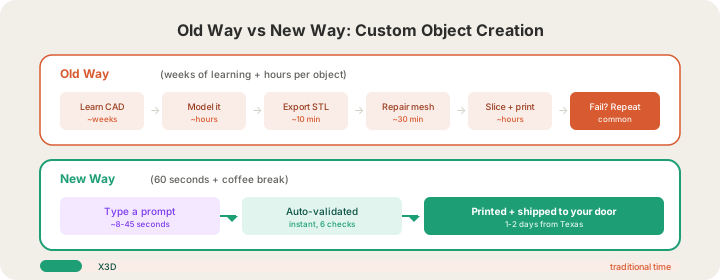
The old path to a custom object: learn Fusion 360 or Blender (weeks), model the part (hours), export, slice, fail, repair, reprint. Or hire a CAD designer at $30–100/hour. Or settle for whatever exists on STL marketplaces.
The new path is 60 seconds of generation plus a coffee break of print time. It changes who gets to make things — you no longer need to be an engineer to manufacture a one-of-one object.
FAQ
Do I need a 3D printer?
No — that's the point. We print and ship. If you do own a printer, export the validated STL and print at home.
What can't text-to-3D do yet?
Precise mechanical parts with exact tolerances (threads, press-fits) are still parametric CAD territory. Organic, decorative, and general-form objects are where AI generation shines.
How much does it cost to try?
Plans start at $19/month for 100 generation credits — and that includes a free print credit each month. See our pricing page for full details.
Who owns the designs I generate?
Pro Studio plans include commercial rights to the models you generate. Maker plans include personal use rights.
Type your first prompt at the Design Studio, our AI text to STL generator — Fast Draft results land in about 20 to 30 seconds.
Ready to get started?
Upload a 3D model for instant pricing, or generate one with AI.