Meshy vs Tripo vs X3D: Which AI Makes Printable Models?
Meshy vs Tripo is where most makers start, and AI 3D generators like them have gotten remarkably good at turning a text prompt into a mesh. But if your goal is a physical object — not a game asset — the question isn't "which tool makes the prettiest render?" It's "which tool gives me a file that actually prints?" That's where the comparison gets interesting.
Meshy vs Tripo: The Short Answer
- Meshy is the most popular general-purpose generator, with strong texture generation — great for game assets and renders.
- Tripo is fast and produces watertight meshes that many makers use for printing, with STL export.
- X3D Studios is built specifically for printing: every generated model is repaired and run through a six-check printability review before it can be ordered, a model that fails is marked Needs redesign and cannot be ordered, and you can order the physical print in the same workflow.
Different tools for different jobs. Here's the breakdown.
What "printable" actually requires
A mesh that looks perfect on screen can be unprintable. For FDM printing, a model needs to pass six checks — and generic AI generators optimize for visual fidelity, not printability. /docs/studio/design explains each generation mode, how long it takes and what it costs.
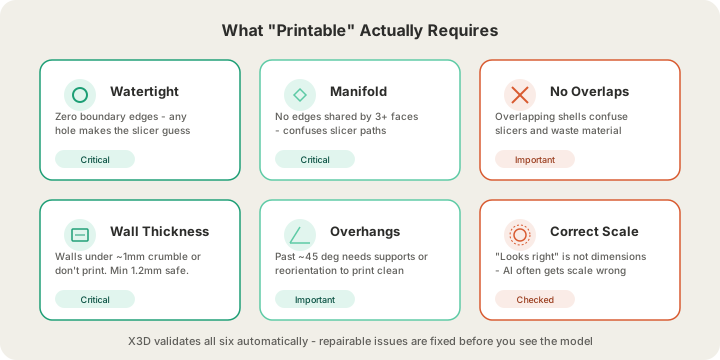
Generic AI generators optimize for visual fidelity — high polygon counts, detailed textures. Most of that matters little to a printer, and some of it actively hurts (a one-colour print discards the texture; ultra-dense meshes can choke slicers).
Feature comparison for 3D printing
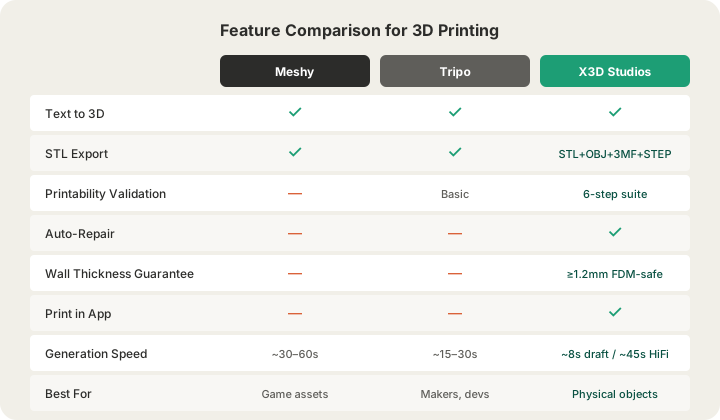
| Feature | Meshy | Tripo | X3D Studios |
|---|---|---|---|
| Text to 3D | ✓ | ✓ | ✓ (Fast Draft about 20–30s, Hi-Fi about 4–5 min) |
| Image to 3D | ✓ | ✓ | ✓ |
| STL Export | ✓ | ✓ | ✓ (+ OBJ and 3MF) |
| Printability Validation | — | Basic checks | 6-step suite + auto-repair |
| Auto-Repair | — | — | ✓ (holes filled, normals fixed) |
| Wall Thickness Review | — | — | Estimated geometry review |
| Print in App | — | — | ✓ ships in 4–5 business days (1–2 with Priority print) |
| Primary Audience | Game devs, artists | Game devs, makers | Makers, physical objects |
The workflow difference
With a general-purpose generator, the print workflow looks like: generate → download → import into a mesh repair tool → fix holes and walls → slice → discover problems → repeat. Experienced makers budget 30–60 minutes of cleanup per model, and beginners often give up.
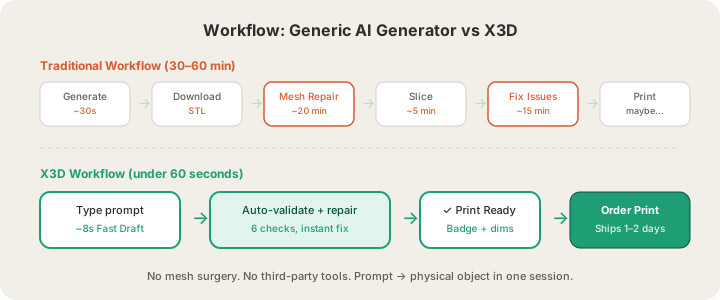
The X3D Design Studio collapses that: generate → validation runs automatically (repairs are made and reported to you) → you see a "Print Ready" badge with actual measurements (wall thickness, overhang count) → click print. The model ships from our Texas farm as a finished object. From prompt to physical object, no mesh surgery.
What About Hitem3D and 3D AI Studio?
Two more names come up in the same searches. Hitem3D is an image-to-3D generator: one photo in, a detailed mesh out, downloadable as GLB, OBJ, FBX or STL. Its own FAQ says the result is a base model and that wall thickness, closure and supports should still be checked in a slicer before printing. 3D AI Studio is an aggregator rather than a single engine: one account reaches several generators (Tripo, Hunyuan, TRELLIS and Meshy among them), with conversion and part-splitting tools around them. X3D's own generator uses some of the same engines through it.
| Hitem3D | 3D AI Studio | X3D Studios | |
|---|---|---|---|
| What it is | Image-to-3D generator | Aggregator of several 3D engines | Generator plus a print farm |
| Input | A photo | Text or image, depending on engine | Text, a photo, photo plus text, or 2–4 photos |
| Downloads | GLB, OBJ, FBX, STL | Depends on engine; STL conversion offered | STL, OBJ, 3MF |
| Printability review before ordering | Its FAQ says to check walls, closure and supports in a slicer | Not stated | Yes: watertight, walls, overhangs, build-volume fit |
| Order the physical print | Not stated | Not stated | Yes, in the same session |
Checked against each product's own public pages in October 2026; features change quickly, so treat anything marked "Not stated" as a question to ask them rather than a no.
How to Test Any Generator's Output Yourself
You do not have to take anyone's word for printability, ours included. Export an STL from whichever generator you used and upload it at /print: it is measured on our servers, checked for a closed mesh, holes, branching edges and build-volume fit, and priced from a real slice, without an account. Developers can run the same geometry check for free on any file with POST /api/printability, documented at /docs/api/printability. Compare the verdicts side by side, and you have your own test table for the prompts you actually care about.
When to use which
Use Meshy or Tripo when:
- You need textured assets for games, AR/VR, or animation
- Texturing quality matters more than the printed shape
- You're building a digital portfolio or concept art
- You have mesh repair experience and don't mind the cleanup
Use X3D when:
- The end goal is a physical object — a desk ornament, prototype, replacement part, or gift
- You want your first print to work without 30 minutes of mesh repair
- You don't own a printer and want the printed part delivered to your door
- You want STL/OBJ export to print at home on any FDM printer
- You are starting from words or a picture rather than a file: /text-to-stl and /photo-to-3d-print show what each costs and what to expect
FAQ
Can I print Meshy or Tripo models at X3D?
Yes. Export STL, GLB or 3MF and upload it at /print — OBJ is not accepted for printing, so convert it first. We run the same checks on uploaded models and quote from a real slice, without an account.
Is AI 3D generation good enough for functional parts?
For decorative and moderately functional parts, yes. For precision engineering parts with exact tolerances, parametric CAD is still the right tool — AI generation excels at organic and aesthetic shapes.
What does it cost?
A new account starts with 5 generation credits, and a Fast Draft from a text prompt costs 1. The Maker plan is $19/month for 100 generation credits and one free print worth $5 a month. Printing is priced separately by weight, from $0.12 per gram for PLA. /pricing has the full details.
What is the best AI 3D model generator for printing?
We have not run a controlled side-by-side test, so we will not crown one, and X3D itself generates with several of the same engines, Tripo and, where enabled, Meshy among them. The difference is what happens around the mesh: X3D repairs the result, reviews it for a closed surface, walls and overhangs, and will not let a model that fails be ordered. The fair test is your own prompts: upload each tool's STL at /print, or POST it to /api/printability, and compare the verdicts.
Try it yourself: type a prompt at /design and get a checked, print-ready Fast Draft in about half a minute. No mesh repair needed. /text-to-stl covers what it costs and how to write a prompt that prints.
Ready to get started?
Upload a 3D model for instant pricing, or generate one with AI.