AI 3D Model Quality: Why Prints Look Uncanny
AI 3D model quality has an uncanny valley: the gap between a mesh that looks convincing on a screen and an object that reads as wrong the moment it is sitting on your desk. It is worst on human faces and hands, but the causes are mechanical rather than mysterious: generators produce geometry optimised for a camera, not a nozzle, so baked textures, smooth shading and a viewport with no units hide problems that a printer cannot hide. Knowing which flaws are cosmetic and which are physical is the difference between a $3 print you keep and a $3 print you bin.
Why AI 3D Model Quality Falls Apart in Your Hand
In 2D you look at an image. With a printed object you hold it, rotate it, and compare it against real things sitting next to it that have known sizes. Your hands are a much harsher detector than your eyes — a face that survives a hero-angle render at 1200 pixels falls apart when it is 12 mm tall and you are turning it under a desk lamp.
FDM printing also strips the model down to one channel. No colour, no normal map, no roughness, no subsurface scattering. Every trick the generator used to imply detail without modelling it is discarded at slice time, and what is left is pure shape. That is the honest test of an AI mesh, and most of them have never been given it. /docs/studio/design explains each generation mode, how long it takes and what it costs.
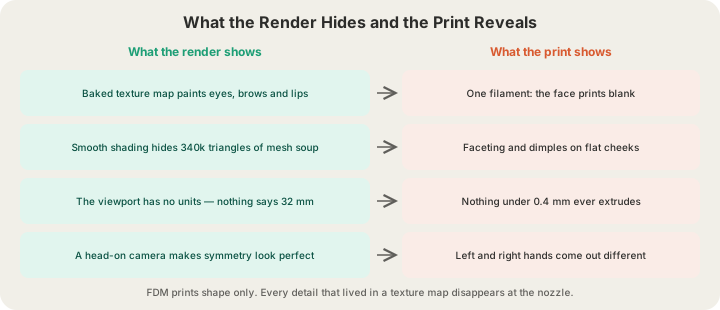
The Six Ways an AI Mesh Goes Uncanny
| Symptom | Cause | How it prints | What actually helps |
|---|---|---|---|
| Blank, soft face | The detail lived in a texture map, not in geometry | Smooth dents where the eyes should be | Print larger, or prompt for deeply carved features |
| Waxy, melted surfaces | The generator averages across everything it has seen | Rounded, low-contrast forms that read as a candle | Re-roll with hard-edge, faceted, angular language |
| Symmetry drift | Nothing constrains the left side to match the right | Mismatched hands, uneven shoulders, one lazy eye | Mirror one half in a mesh editor before ordering |
| Triangle soup | Marching-cubes output with no retopology pass | Faceting and shallow dimples across flat panels | Remesh, or scale up until the facets stop reading |
| Scaleless detail | The viewport has no units, so nothing is too small | Anything under about 0.4 mm never extrudes at all | Scale up, or delete detail you cannot print |
| Floating parts | Generators do not model contact between objects | Islands the slicer tries to build in mid-air | Check the mesh from underneath before ordering |
Only two of those six are aesthetic. The other four are geometry problems with geometry fixes, and they are the ones worth checking first because they are the ones that waste filament. If you want the full picture of why generators produce these particular artefacts, How AI Text-to-3D Model Generation Works: Prompt to Mesh walks through what actually happens between the prompt and the mesh.
Texture Is Not Geometry
This is the single biggest cause of disappointment, and it is easy to miss. A GLB file carries both a mesh and a texture. When a generator produces "detailed leather armour with rivets," a large share of that detail is frequently painted onto a smooth shell rather than modelled into it. On screen the two are indistinguishable. On a printer only one of them exists.
Multi-colour printing does not rescue this. A 4-tray AMS gives you four flat regions of solid filament (eight with a second unit), not a texture map — it can make a cloak red and a face pale, but it cannot paint an iris, and every colour change costs 84 mm³ of purged plastic. On a small figure the purge routinely outweighs the model itself. Multi-Color 3D Printing Explained: How the AMS Works goes through how the swaps and the waste really add up.
Where the Valley Bottoms Out: Scale
A 0.4 mm nozzle lays down a line roughly 0.42 mm wide. That is the smallest raised or recessed feature that can physically exist on the part. Layer height sets the vertical resolution on top of that — 0.2 mm standard, or 0.1 mm on our premium tier at 1.75x the rate. Below those numbers, geometry is not coarse; it is absent.
Take a 1.7 m human and scale them to a 32 mm tabletop miniature. That is a 1:53 reduction. Now scale their features by the same factor and compare against the 0.4 mm floor.
| Feature | Real size | At 32 mm | At 75 mm | Survives? |
|---|---|---|---|---|
| Iris | 12 mm | 0.23 mm | 0.53 mm | 75 mm only |
| Lip edge | 8 mm | 0.15 mm | 0.35 mm | Neither, cleanly |
| Nostril | 10 mm | 0.19 mm | 0.44 mm | 75 mm, just barely |
| Finger | 18 mm | 0.34 mm | 0.79 mm | 75 mm only |
| Belt | 30 mm | 0.56 mm | 1.32 mm | Both |
| Cloak fold | 60 mm | 1.13 mm | 2.65 mm | Both, clearly |
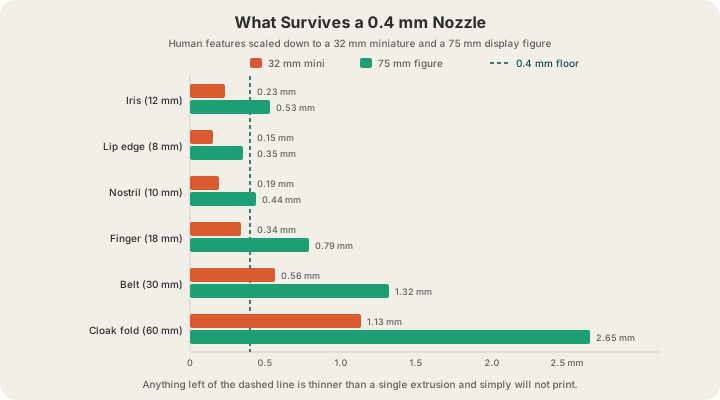
This is the part that reframes the whole problem. At tabletop scale an AI face is not badly made — it is correctly made and therefore invisible. The generator reproduced true human proportions, and true human proportions do not survive a 1:53 reduction.
Which Subjects Fall In, and Which Do Not
The valley is not a property of the tool. It is a property of how much reference you personally carry for the subject.
| Subject | Valley risk | Why |
|---|---|---|
| Human and humanoid faces | Highest | You have a lifetime of reference for every millimetre |
| Hands, feet, familiar animals | High | Same reason, with slightly more tolerance |
| Stylised and cartoon characters | Low | There is no correct version to compare against |
| Monsters, creatures, aliens | Low | Nothing for the model to be wrong about |
| Brackets, enclosures, mechanical parts | Very low | Judged by fit, not likeness — but tolerances matter |
| Abstract, organic and decorative forms | None | Averaging is a feature here, not a bug |
The practical read: if you want a person, either go stylised or go big. If you want a vase, a lamp shade, a topographic wall panel or a fantasy beast nobody has ever met, generators are already excellent and the valley never opens. That is also roughly the split you see in the tool comparisons at Meshy vs Tripo vs X3D: Which AI Makes Printable Models? — the differences between generators shrink dramatically once the subject stops being a human being.
The Fix List, in Order of Payoff
- Turn textures off and look at the raw mesh. Thirty seconds, catches the single most common disappointment.
- Scale up. 54 mm is the first height where a generated face reads at all; 75 mm is where it holds up under a lamp.
- Prompt for exaggeration — deep-set eyes, heavy brow, carved folds — rather than for realism.
- Re-roll three times and keep the best. Generation is cheaper than repair, and symmetry drift varies run to run.
- Print a 32 mm test at the $1.00 minimum before committing to a 120 mm statue at $25.32. Same file, about 4% of the cost, and you learn what actually survives.
- Prime and wash it. Grey primer plus a dark wash puts contrast back into recesses the nozzle rendered faithfully but flatly.
Step five is the one people skip and then regret. A test print is the only feedback loop in this entire process that tells you the truth, and at the $1.00 per-part minimum on PLA it costs less than the coffee you drink while it prints.
What We Do About It on the Farm
We cannot make a generator sculpt better, but we can stop you paying for a file that was never going to work. Models get a server-side mesh review before checkout — watertightness, floating shells, degenerate faces — and Watertight Meshes: Six Checks for a Print-Ready Model lists exactly what that pass looks for and why each check exists.
Quotes come from a real OrcaSlicer slice of your model wherever possible, not a bounding-box estimate. That matters more for AI meshes than for anything else, because a 340,000-triangle generated blob and a clean 40,000-triangle version of the same silhouette can slice to noticeably different weights. You see the number the machine will actually extrude before you pay, at /print. A sliced .gcode.3mf you upload yourself goes through a safety validation pass against the specific printer it is headed for, and once it is running an operator watches it on a live camera in the Austin farm.
FAQ
Why do AI-generated faces look wrong when printed?
Three reasons stacked on top of each other. The eyes, brows and lips you saw in the render were often painted into a texture map that printing discards. What geometry remains is correctly proportioned, which means at miniature scale it falls below the 0.4 mm the nozzle can resolve. And nothing in the generation process enforced left-right symmetry, so the errors that remain are the specific kind humans are best at detecting.
What size should I print an AI-generated human figure?
54 mm is the practical minimum for a face that reads, and 75 mm is where facial features clear the print floor with room to spare. Below 54 mm you are printing a silhouette, which is fine for tabletop use but will not look like your character. Premium 0.1 mm layers are worth it at these sizes; on a 19 g figure the upgrade is $1.71.
Can multi-colour printing fix a blank AI face?
Not really. A 4-tray AMS gives you up to four solid colours split by region, eight with a second unit, which is a different thing from a texture map — it cannot resolve an iris or a lip line, and each swap purges 84 mm³ of plastic and takes about 1.3 minutes. On a small figure the purge frequently outweighs the model. A plain STL prints in the one filament you choose in any case; a multi-colour print comes from a project with its colours painted or assigned, which we slice in those colours, or a plate you sliced yourself. Paint puts contrast into recesses far more cheaply than filament does.
Does uploading a higher-poly file give me more detail?
Only up to the point where the triangles are smaller than the nozzle, which happens quickly. Past that, extra polygons add file size and slicing time without changing a single extrusion. What does change the result is the underlying shape and the print scale. We accept STL and GLB up to 100 MB and 3MF (a sliced plate as .gcode.3mf) up to 40 MB; OBJ is not accepted, so export STL or GLB instead.
Ready to get started?
Upload a 3D model for instant pricing, or generate one with AI.