Drawing to 3D Model: Turn a Child's Art Into a Toy
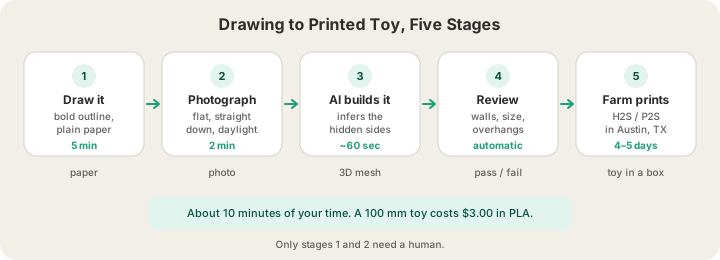
To go from a child's drawing to a 3D model and a printed toy: photograph the drawing flat in daylight, upload the photo to an image-to-3D generator, thicken any limb that came out too skinny to survive a child, and send the file to a print farm. The AI does the modelling in under a minute. A palm-sized toy in PLA is about $3.60 at our all-in $0.12 per gram, and normal print ships in 4–5 business days, or 1–2 with Priority print ($5 at checkout).
What the AI Does to Turn a Drawing Into a 3D Model
Image-to-3D works by inference. The model was trained on millions of 3D objects, so when it sees a picture it predicts what the object would look like from angles the picture never showed, then fuses those predicted views into one mesh. A photo of a real object gives it plenty to work with. A drawing gives it almost nothing about depth - a crayon dinosaur is a flat shape with an outline - so the model invents a plausible thickness, usually something close to a rounded, gently bulging version of the silhouette. That guess is the reason drawings turn into charming, slightly puffy toys rather than accurate sculptures, and it is exactly what most people want. /docs/studio/image-to-3d explains which photos turn into good models.
Drawings are also a much friendlier input than they sound. The hardest part of Image to 3D Model: Turn Any Photo into a Real 3D Print is separating the subject from a cluttered background under bad light. A child's drawing is a bold dark outline filled with flat colour on plain white paper: perfect segmentation conditions, handed to you for free. The failure modes are different, and they are all about thinness rather than confusion.
Photograph the Drawing Like a Scanner
Everything downstream inherits the quality of this photo, and it takes two minutes to get right. Lay the paper flat on a table, uncurled and untaped. Stand directly over it so the page is a rectangle rather than a trapezoid. Use daylight from a window rather than a ceiling lamp, and move so your own shadow is not falling across the page. Then crop tight to the paper before uploading.
| Factor | Do this | Avoid |
|---|---|---|
| Surface | Flat on a table, paper uncurled | Held up by hand, taped to the fridge |
| Camera angle | Straight down, page fills the frame | Tilted, keystoned, edges cropped off |
| Light | Even indirect daylight | Overhead lamp casting your own shadow |
| Background | Plain table, then crop to the page | Crayons, other drawings, wood grain |
| The art itself | One bold outline, colour filled in | Faint pencil, sketchy repeated strokes |
| Subjects | One character per photo | A whole scene with three characters |
Which Drawings Become Good Toys
Not every drawing converts equally well, and it is worth picking deliberately from the fridge rather than grabbing the newest one. Chunky beats detailed every time.
| Drawing type | How well it converts | Watch for |
|---|---|---|
| Round, chunky creature or monster | Excellent | Almost nothing - this is the ideal input |
| Robot, house, car, boat | Very good | Corners come out genuinely sharp; ask for rounded edges |
| Character with a big head and small body | Very good | Top-heavy - it may want a wider base |
| Stick figure | Poor as drawn | Limbs land near 1 mm; thicken them or redraw chunkier |
| Long antennae, whiskers, capes, tails | Risky | These are what snap first in play |
| Name or word in bubble letters | Excellent | Prints beautifully as a flat plaque or keychain |
| A whole scene with several characters | Poor | The AI fuses them into one blob; shoot each separately |
Make It Survive a Four-Year-Old
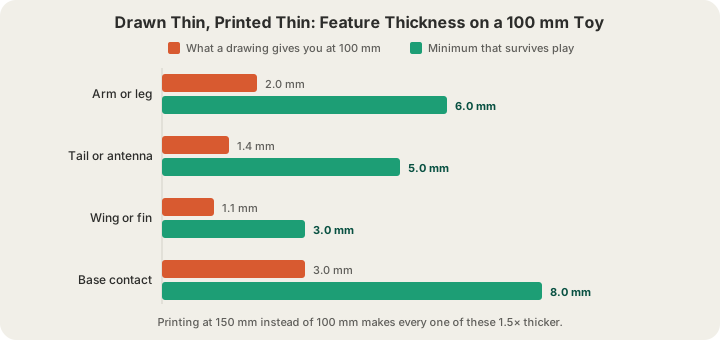
This is where drawings and printers actually collide. A child draws an arm as a line perhaps two millimetres wide on a page that is 200 mm tall. Scale that page down to a 100 mm toy and the arm becomes a one-millimetre stub - a feature the nozzle can barely produce and a hand can snap without trying. The chart below compares what a typical drawing hands you at 100 mm against what each feature needs in order to be played with rather than displayed.
| Feature | Typical at 100 mm | Minimum for play | How to fix it |
|---|---|---|---|
| Arm or leg | 2.0 mm | 6 mm | Scale the toy up, or redraw the limb as a tube |
| Tail or antenna | 1.4 mm | 5 mm | Curl it against the body instead of sticking out |
| Wing, fin or flat plate | 1.1 mm | 3 mm | Thicken, or accept it as display-only |
| Base contact patch | 3.0 mm | 8 mm | Add an oval base under the feet |
| Any detachable piece | - | Do not print one | Keep the toy a single solid body |
There are only two levers. The first is size: printing at 150 mm instead of 100 mm makes every feature 1.5 times thicker, which turns that 2 mm arm into 3 mm. The second is geometry: change the drawing or the prompt so the limb is a tube rather than a line. Orientation matters too, because a printed arm is a stack of layers and it will snap along the layer lines rather than across them - 3D Print Orientation for Strength: How to Orient a Model explains which way up to lay a part so the weak axis is not the one under load. On our side, the printability review that runs at /design checks mesh integrity, dimensions, estimated wall thickness and overhangs before a model can go to checkout, and Watertight Meshes: Six Checks for a Print-Ready Model covers what each of those checks is looking for.
What It Costs
PLA is $0.12 per gram all-in - filament and normal machine time in one number - with billable weight rounded up to the whole gram and a $1.00 minimum per part. Weight follows the cube of the height, so the size decision is really the price decision. Here is the same drawing-derived character at four heights.
| Height | Sliced weight | Price | Notes |
|---|---|---|---|
| 60 mm | 7 g | $1.00 | Below the minimum on weight, so the $1.00 floor applies |
| 100 mm | 30 g | $3.60 | The sweet spot: real toy scale, cheap |
| 150 mm | 101 g | $12.12 | Limbs get 1.5x thicker, and much tougher |
| 200 mm | 240 g | $28.80 | Big shelf character, roughly a half-day print |
Add $7 standard US shipping, free over $49.50, or $15 express. Printing three or four siblings' drawings in one order is the obvious move: five or more units take 5% off, ten or more take 10%, and they share the one shipping charge. Every material is priced the same way, per gram, all-in.
Colour: Match the Crayons, or Let Them Paint
Drawings are colourful and FDM printing is not, at least not for free. Our machines carry a four-tray AMS, which is a filament changer feeding one nozzle rather than four nozzles running at once. Each colour change parks the print, cuts the filament, loads the next spool and pushes 84 mm³ of plastic through to flush the old colour out. Three or four broad colour regions add almost no purge. A toy painted in four colours across its full height needs a change on nearly every layer, and around 900 of those changes purge roughly 95 g of plastic - more than the toy itself weighs. Multi-Color 3D Printing Service: What to Check First shows how the same mesh can mean three filament changes or nine hundred depending purely on how the colours are arranged.
How the colour gets there is decided in a slicer, not at checkout, and the drawing's colours on screen are not a promise of what prints. Every colour print is priced from a real slice of the model in its colours. To decide exactly where each colour goes, paint the model in Bambu Studio or OrcaSlicer and upload the project .3mf at /print, which we slice plate by plate in those colours, or export a sliced .gcode.3mf and we print it exactly as exported. Bambu Studio Multi-Color Print Setup, Step by Step walks through it, and /docs/studio/multi-color covers every route. That leaves four routes worth weighing up:
- One colour, then paint it. Print in white PLA and hand the child acrylics. Cheapest option, and it gives them a second craft session with the thing they invented.
- Two or three colour bands. Body in one colour, base or head in another. A handful of changes and a few cents of purge in the plate you slice.
- Separate parts, separate colours. Print a red body and a green tail as two objects and glue them. Zero purge, and both parts get their strongest orientation.
- Full multi-colour painting. Beautiful, and by far the most expensive, because nearly every layer buys another purge. Worth it for a keepsake, rarely worth it for a toy that lives in a toy box.
Getting It Made
Generate the model at /design from the photo, then send it to print. Uploads at /print accept STL, GLB and 3MF (a sliced plate as .gcode.3mf); OBJ is not accepted, so convert if your tool defaults to it. Wherever possible the quote comes from a real OrcaSlicer slice of your actual mesh rather than a volume estimate, so the grams on the invoice are the grams the machine extrudes. Maximum part size is 340 × 320 × 340 mm, which is far larger than any drawing-derived toy needs.
Jobs run on Bambu Lab H2S and P2S printers in Austin, Texas. Uploaded G-code passes an automated safety validation pass before a machine will accept it, live cameras cover every plate, and finished plates auto-eject so the queue keeps moving overnight. You see the order move through placed, printed, packed, shipped and delivered.
FAQ
Can you convert a child's drawing to a 3D model?
Yes, and the modelling step is automatic. You photograph the drawing, an image-to-3D model infers a full three-dimensional form from the flat art, and the result is a mesh you can print. What you get is an interpretation rather than a literal extrusion - a rounded, slightly puffy version of the character - which is usually more appealing as a toy than a flat cut-out would be.
How much does it cost to 3D print a kid's drawing?
About $3.60 for a 100 mm character in PLA at our $0.12 per gram all-in rate, roughly $12 at 150 mm and $29 at 200 mm, since weight scales with the cube of the height. There is a $1.00 minimum per part, so keychain-sized pieces cost $1.00. Shipping is $7 flat in the US, free over $49.50 in the cart.
What is the best way to photograph a drawing for 3D printing?
Lay the paper flat, shoot straight down in indirect daylight so no shadow crosses the page, fill the frame with the drawing, and crop to the paper edges before uploading. One character per photo. If the outline is faint pencil, trace it in black marker first - a bold, closed outline is the single biggest quality factor.
Is a 3D printed toy safe for a toddler?
Treat it as a display piece for under-threes. Printed parts are not certified toys: small pieces are a choking hazard, thin limbs snap into sharp fragments, and layer lines trap grime. If a young child will handle it, print it as one solid body at 150 mm or larger with limbs at least 6 mm thick, keep it in PLA, and supervise play.
Ready to get started?
Upload a 3D model for instant pricing, or generate one with AI.