Price a 3D Print Programmatically
To price a 3D print programmatically you convert geometry into billable grams and multiply by a published per-gram rate: volume × (walls + infill) × material density, rounded up to the whole gram, times the rate. At X3D that is $0.12 per gram all-in for PLA with a $1.00 minimum per part, so a 48 cm³ bracket weighs 27 g and costs $3.24 to print. You can implement the whole thing in about fifteen lines, or POST the dimensions to /api/price and let our endpoint do it. This post shows both, with the numbers our production pricing code actually returns.
Price a 3D Print Programmatically: The Whole Formula
There is no hidden model here. Weight-based pricing is deliberately the kind of arithmetic you can audit, which is what makes it safe to expose over an API in the first place — a customer can check the invoice with a calculator.
billableGrams = ceil(
    volumeCm3
  × (0.30 + 0.70 × infillFraction)   // solid walls, then lattice inside
  × densityGramsPerCm3               // PLA 1.26
)

perUnit = billableGrams × ratePerGram × qualityFactor   // PLA $0.12, premium 1.75×
        + excessHours × 1.50                            // sliced files only; usually zero

subtotal = max(perUnit × quantity × bulkFactor,         // 5+ = 0.95, 10+ = 0.90
               1.00 × quantity)                         // per-part minimum

total    = subtotal + shipping                           // $7 flat US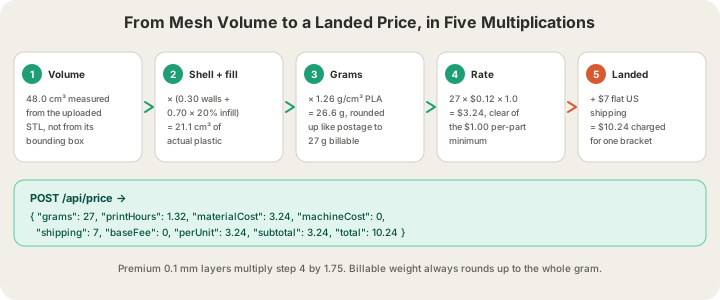
Step 1: Get a Volume You Can Trust
Everything downstream is arithmetic; the only genuinely hard part is knowing how much plastic the part contains. There are three answers, and they are not close to each other.
| Volume source | What it can see | Good for | Our 48 cm³ bracket |
|---|---|---|---|
| Bounding box | A solid block drawn around the part | Live sliders in a configurator | 189 cm³ → 105 g → $12.60 |
| Mesh volume | The actual enclosed geometry | Server-side quoting from an STL | 48 cm³ → 27 g → $3.24 |
| Real slice | Walls, seams, supports, purge waste | The number we bill against | Measured in OrcaSlicer |
A bounding box is a fine first approximation and a terrible final one: it treats a lattice planter and a solid paperweight identically. Mesh volume is the right default for a server that has the file, and computing it is a signed-tetrahedron sum over the triangles — cheap, exact, and available in every mesh library. A real slice is the only source that sees things geometry cannot, which is why our own quotes prefer it.
Step 2: Turn Volume Into Billable Grams
A printed part is not solid. It is a shell of solid perimeters with a sparse lattice inside, so the plastic actually extruded is a fraction of the enclosed volume. We model the shell as 30% of volume and apply the infill percentage to the remaining 70%. Then density converts cubic centimetres to grams, and the result rounds up to the whole gram like postage.
const WALL_FRACTION = 0.30; // solid perimeters
const DENSITY = { pla: 1.26, petg: 1.27, abs: 1.04, asa: 1.07, tpu: 1.21 };

function billableGrams(volumeCm3, infillPct, material) {
  const infill = Math.min(100, Math.max(5, infillPct)) / 100;
  const plasticCm3 = volumeCm3 * (WALL_FRACTION + (1 - WALL_FRACTION) * infill);
  return Math.ceil(plasticCm3 * DENSITY[material]);
}

billableGrams(48, 20, "pla"); // 21.12 cm³ → 26.61 g → 27
Two details matter more than they look. The density figure is 1.26 g/cm³ because that is Bambu PLA Basic's spec sheet — the spool the farm actually loads. Using the generic 1.24 put our weights about 2% under whatever the customer's own slicer told them, which is a small error that produces a large amount of email. And the rounding is up, not to nearest: Bambu Studio displays whole grams, so the 21 g a customer was quoted against is already a rounded number, and sub-gram slicer noise must not turn $2.52 into $2.47.
Infill is the one input a caller usually controls, and it moves the price more than most people expect. Here is the same 48 cm³ bracket at four densities, and the reasoning behind picking one is in 3D Printing Infill Explained: Patterns, Density, and Cost.
| Infill | Plastic volume | Billable weight | PLA cost |
|---|---|---|---|
| 10% | 17.8 cm³ | 23 g | $2.76 |
| 20% (default) | 21.1 cm³ | 27 g | $3.24 |
| 50% | 31.2 cm³ | 40 g | $4.80 |
| 100% | 48.0 cm³ | 61 g | $7.32 |
Step 3: Turn Grams Into Dollars
The per-gram rate is all-in: filament and normal machine time in a single number, so there is no separate hourly line to reconcile. Layer height is a multiplier rather than a second rate — premium 0.1 mm layers take roughly twice as long on the machine, which works out to 1.75× the all-in rate; standard 0.2 mm is 1×.
const RATE = { pla: 0.12, petg: 0.12, abs: 0.12, tpu: 0.13, asa: 0.14 };
const QUALITY = { standard: 1.0, premium: 1.75 }; // 0.2 mm vs 0.1 mm layers

const perUnit = Math.max(
  billableGrams(48, 20, "pla") * RATE.pla * QUALITY.standard,
  1.00 // per-part minimum
); // 3.24
Because density and rate both move, the cheapest material is not always the one with the lowest rate. Here is that identical 48 cm³ mesh at 20% infill in all five plastics we run — ABS shares PLA's rate but is light enough to come out cheaper. The material trade-offs themselves are covered in How Much Does Custom 3D Printing Cost in 2026? Full Pricing Breakdown.
| Material | Density g/cm³ | Rate $/g | Billable weight | Print cost |
|---|---|---|---|---|
| PLA | 1.26 | $0.12 | 27 g | $3.24 |
| PETG | 1.27 | $0.12 | 27 g | $3.24 |
| ABS | 1.04 | $0.12 | 22 g | $2.64 |
| ASA | 1.07 | $0.14 | 23 g | $3.22 |
| TPU | 1.21 | $0.13 | 26 g | $3.38 |
Step 4: The Hours Weight Cannot Explain
For a single-colour part, weight explains the whole cost and the formula above is complete. Multi-colour breaks that assumption badly, and no volume-based model can see why. Every filament change on a single-extruder AMS machine parks one spool, purges the hotend and primes the next — 84 mm³ of filament thrown away per change, which is not our guess but the number in Bambu's own H2S profile (a 280 mm³ flush matrix at a 0.3 multiplier). Worse, the changes cost time: about 1.3 minutes each, and a four-colour model changes on essentially every layer.
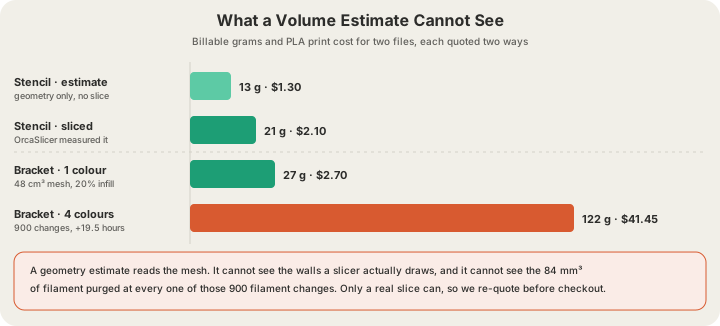
Take that same bracket at 60 mm tall and slice it yourself for four colours. At 0.2 mm layers it is 300 layers, and three extra colours means roughly 900 changes. The purge alone is 75.6 cm³ of PLA — 95 g of plastic that ends up in the bin — and the changes add 19.5 hours of machine time, billed at $1.50 per hour because weight cannot account for it.
| Same bracket | One colour | Four colours |
|---|---|---|
| Filament changes | 0 | 900 |
| Purge waste | 0 g | 95 g at 84 mm³ per change |
| Billable weight | 27 g | 122 g |
| Per-gram charge | $3.24 | $14.64 |
| Tool-change time | 0 h | 19.5 h × $1.50 = $29.25 |
| Per-unit price | $3.24 | $43.89 |
The physical side of that waste — purge towers, flushing into infill, and how to design a model so it needs fewer changes — is covered in How Much Waste Does Multi-Color Printing Create?.
Step 5: Quantity, Shipping and the Landed Total
The last multiplications are the boring ones, and they are the ones customers notice. Apply them in this order:
- Multiply the per-unit price by quantity, then apply the bulk factor: 5% off at 5 or more units, 10% off at 10 or more.
- Floor the result at $1.00 per part, so a bulk order of tiny objects cannot fall through the minimum.
- Add shipping: $7 flat within the US, free once the print subtotal clears $50. International is $30 flat, free over $500.
- Round to cents once, at the end. Rounding at every step is how a quote and an invoice drift apart.
Twenty-five of our brackets is a clean illustration: $3.24 each, ×25 = $81.00, ×0.90 for the bulk tier = $72.90, which clears $50 and therefore ships free. Per unit that is $2.92 landed, against $10.24 for a single one. The live rate card is at /pricing if you want to check any of this against the site.
Or Just Call /api/price
If you would rather not own the arithmetic, POST the bounding box, material, quality and quantity and read the breakdown back. It is a plain JSON endpoint, documented alongside the rest in /api-docs.
curl -X POST https://x3dstudios.com/api/price \
  -H "Content-Type: application/json" \
  -d '{ "bboxMm": { "x": 90, "y": 60, "z": 35 },
        "material": "pla", "quality": "standard", "quantity": 1 }'

{
  "grams": 105, "printHours": 5.2,
  "materialCost": 12.6, "machineCost": 0,
  "perUnit": 12.6, "subtotal": 12.6,
  "shipping": 7, "baseFee": 0, "total": 19.6,
  "currency": "USD"
}
Note what just happened: that is the same bracket, and the answer is $19.60 rather than $10.24. The endpoint was given a bounding box, so it priced a 189 cm³ solid block instead of a 48 cm³ mesh. Send bounding boxes only for parts that genuinely fill their box, or send the file and let the farm measure it. The endpoint also enforces the plate: dimensions are sorted before comparison against the 340 × 320 × 340 mm build volume, so a long thin part that fits when rotated is not rejected on one axis, and anything genuinely too big comes back as a 400.
Keeping Your Numbers and Ours in Agreement
The estimate is a starting point, not a promise. When a file reaches us we slice it for real in OrcaSlicer against the Bambu profile, cache the measured filament volume, seconds and layer count on the model, and every downstream quote path picks those numbers up. Slicing takes 10 to 60 seconds, so the very first quote a customer sees may still be the estimate — which is exactly why the cart re-prices before checkout rather than charging whatever the first render showed.
Two practical notes for anyone integrating. First, formats: we accept STL, GLB, 3MF and already-sliced G-code (.gcode / .gcode.3mf), with a 100 MB limit on meshes and 40 MB on sliced files. OBJ is not accepted, so convert before you upload. Second, GLB is a container rather than a mesh file as far as the slicer CLI is concerned, so GLB uploads stay on the geometry estimate — send STL or 3MF if you want the measured number. The wider integration path, from key to shipped part, is in Add 3D Printing to Your App With One POST Request.
FAQ
How do I calculate 3D printing cost from a model file?
Compute the mesh volume in cm³, multiply by (0.30 + 0.70 × your infill fraction) to get the plastic actually extruded, multiply by material density, round up to the whole gram, then multiply by the per-gram rate. For PLA at $0.12/g that gives a 48 cm³ part a 27 g weight and a $3.24 print cost, before shipping and any per-part minimum.
Why does my slicer report a different weight than the estimate?
Because a slicer knows things geometry does not. Thin, flat parts are the clearest case: a stencil that a geometry estimate puts at 13 g weighs 21 g in Bambu Studio, because almost all of it is solid wall rather than infill. That is a 62% gap on a real file, and it is why we slice for real rather than shipping the estimate as the invoice.
Does material or infill change the price more?
Infill, usually. Swapping PLA for ASA on our 48 cm³ bracket moves the price from $3.24 to $3.22, under 1%. Moving that same bracket from 10% infill to 100% moves it from $2.76 to $7.32, about 165%. Density complicates the material comparison too — ASA costs more per gram than TPU but is light enough to come out cheaper for the same shape.
Can I get a quote without uploading the file?
Yes. POST a bounding box, material, quality and quantity to /api/price and the full breakdown comes back — grams, print hours, per-unit, subtotal, shipping and total. Just remember it is a solid-block approximation, so it over-quotes hollow or lattice parts. Upload the model when you need the number you will actually be charged.
Ready to get started?
Upload a 3D model for instant pricing, or generate one with AI.