3D Printing Infill Explained: Patterns, Density, and Cost
Infill is the internal structure of a 3D print: a repeating lattice the slicer draws inside the solid walls of your model. Almost no printed part is solid plastic. A typical object uses 10 to 25% infill, meaning the interior is mostly air held in shape by a pattern like grid or gyroid. That one setting drives weight, strength, print time, and price, and since our farm charges $0.12 per gram all-in, every percentage point of infill is money. Here is how patterns and densities actually behave, and how we set them for your orders.
What Infill Actually Is
When a slicer prepares a model for printing, it splits the geometry into three zones: the outer walls (usually 2 to 4 perimeter lines), the solid top and bottom layers, and everything in between. That in-between volume gets the infill pattern. The pattern's job is threefold: support the top layers so they do not sag, brace the walls against flexing, and carry loads through the part's interior. More infill does all three jobs better, but with sharply diminishing returns past a point.
Infill also sets print time, which is why farms care about it as much as customers do. Interior lattice is printed at the machine's highest speeds, up to 500mm/s on our Bambu Lab CoreXY printers, but plastic still takes time to extrude. A part at 50% infill can take nearly twice as long as the same part at 15%, occupying a printer slot that another order could use. Efficient infill is how a farm keeps both prices and lead times low.
Common Infill Patterns
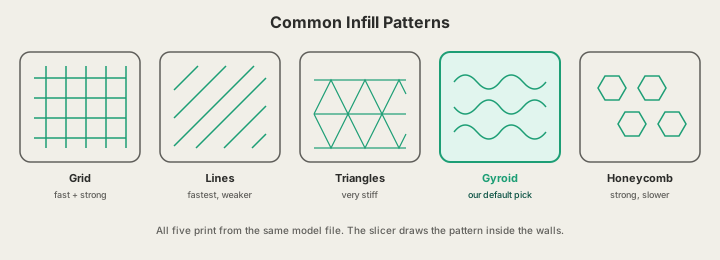
| Pattern | Strength | Print speed | Best for |
|---|---|---|---|
| Grid | Good in-plane | Fast | General parts, everyday default |
| Lines | Weak (one direction) | Fastest | Fast drafts, visual prototypes |
| Triangles | Very stiff in-plane | Medium | Flat parts, brackets, plates |
| Gyroid | Strong in all directions | Medium-fast | Functional parts, best all-rounder |
| Honeycomb | Very strong | Slow | Maximum rigidity when time is free |
Grid and lines are the classic speed picks: straight strokes the printer can lay down at full velocity. Triangles add in-plane stiffness for flat, load-bearing shapes. Honeycomb is famously rigid but slow to print because of all the direction changes. Gyroid, a wave-like surface borrowed from mathematics, is the standout: near-uniform strength in every direction, no long straight lines to cause resonance at high speed, and it prints fast on modern CoreXY machines. It is our default for functional parts.
Infill Density: How Much Do You Need?
Density is the percentage of the interior volume filled with plastic. Here is what each common setting does to a real part: a fist-sized bracket that would weigh 186g printed solid, with about 25g of that in walls and surfaces. Prices use our $0.12 per gram all-in PLA rate.
| Density | When to use it | Part weight | PLA cost |
|---|---|---|---|
| 10% | Decor, figurines, display models | 41g | $4.92 |
| 25% | Everyday functional parts, organizers | 65g | $7.80 |
| 50% | High-stress brackets, tool mounts | 106g | $12.72 |
| 100% | Rare: thin parts, max stiffness needs | 186g | $22.32 |
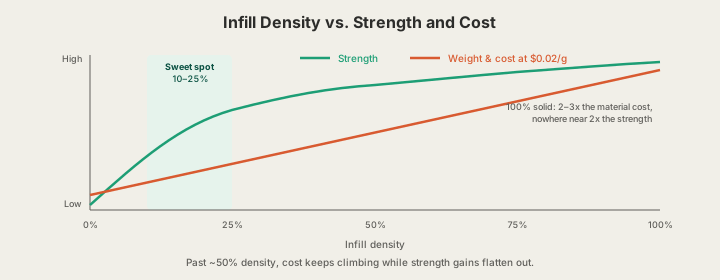
There is a practical floor, too. Below about 8 to 10%, the gaps between infill lines get so wide that the first solid top layers sag into them, a defect called pillowing that shows up as a lumpy top surface. Extra top layers can rescue a 5% part, but at that point the plastic saved is being spent on the ceiling. 10% is the sensible minimum for anything with a flat top face.
Density behaves differently in flexible materials. A TPU phone bumper at 15% gyroid squishes like foam, while the same bumper at 60% feels nearly rigid. For flexible parts, infill percentage is effectively a hardness dial, which is a design tool in its own right: soles, grips, and dampeners are tuned this way rather than by changing material.
The Strength vs. Weight Tradeoff
Strength rises steeply from 0 to about 25% infill, then flattens. Going from 10% to 25% can nearly double a part's compressive strength; going from 50% to 100% roughly doubles the weight and cost for a gain most parts never notice. That is why the 10 to 25% band is the sweet spot for the vast majority of prints, and why 100% infill is almost never the answer to a strength problem.
How We Set Infill on the Farm
When you order at x3dstudios.com, you do not have to touch a slicer. Our pipeline picks the infill pattern and density per part based on its geometry and purpose: display pieces from the AI generator at /design typically run gyroid at 10 to 15%, while functional prints typically use 20 to 30%. Models receive a server-side mesh review before checkout, and every part still passes photo inspection before it ships.
The products in our store get the same treatment: desk clocks run denser infill in the base for stability and lighter infill in the body, which is how a sizable object stays affordable and feels solid at the same time.
FAQ
What is the best infill percentage for 3D printing?
15 to 25% covers most parts. Use 10% for decorative objects, 25% for everyday functional parts, and 40 to 50% only for genuinely high-stress components. Above 50%, put the extra grams into more wall perimeters instead; you get more strength for the same money.
Does 100% infill make the strongest part?
It makes the heaviest part, and only marginally the strongest. FDM parts usually fail at layer bonds or walls, not in the core, so a 100% interior mostly adds cost. The exceptions are very thin parts where infill and walls merge, and parts needing maximum compressive stiffness or thermal mass.
What is the strongest infill pattern?
Gyroid for all-around loads, since its strength is nearly equal in every direction. Honeycomb and triangles edge it out for pure in-plane rigidity but print slower. At equal density the differences are modest; density and wall count remain the bigger levers.
Can I request a specific infill for my order?
Yes. Add a note at checkout on the print page and we will slice to your spec, whether that is 50% gyroid for a load-bearing jig or 10% for a lightweight prop. If you say nothing, you get our geometry-based defaults, which are tuned to hit the strength most parts need at the lowest weight.
Does infill change what my print costs?
Directly. Weight scales almost linearly with density, and our farm charges $0.12 per gram of PLA all-in. The example bracket above costs about $4.92 at 10% infill and $22.32 solid, a 4.5x difference for the same external part.
Ready to get started?
Upload a 3D model for instant pricing, or generate one with AI.