Custom Figurine From a Photo: How Image-to-3D Works in 2026
A custom figurine from a photo is a three-step process in 2026: you upload one clear picture, a single-image reconstruction model predicts the geometry the camera never saw, and the resulting mesh gets repaired and sliced for a real printer. The AI half takes about 45 to 90 seconds and is largely a solved problem. The parts that decide whether you get a keepsake or a blob are the ones around it — the photo you feed in, the height you pick, and whether anything checks the mesh before it reaches a nozzle.
This guide covers the whole photo to figurine path: how image-to-3D actually reconstructs a subject, the four capture routes and when each one wins, exactly what a figurine weighs and costs at our $0.12 per gram all-in PLA rate, and what our farm in Austin does with the file once you order it. /docs/studio/image-to-3d explains which photos turn into good models, and /photo-to-3d-print is the short version: what it costs, how big it comes out and what the AI cannot promise.
How a Photo Becomes a Custom Figurine in 2026
A photo is a single viewpoint. A figurine is a closed volume. Everything interesting in image-to-3D happens in the gap between those two facts. Older approaches closed the gap by measurement: photogrammetry stitches dozens of overlapping photos into a point cloud by triangulating features that appear in more than one frame. It is accurate, and it demands that you already own the object and are willing to walk a circle around it with a camera.
Single-image models close the gap by prediction instead. Trained on millions of 3D objects, they take one image and produce a full volume in a single forward pass — no optimization loop, no second photo, no turntable. When the model sees the front of a seated cat, it is not measuring the back; it is drawing on every cat-shaped object it has ever encountered and producing the most plausible back. That is why the technique is spectacular on familiar, roughly symmetric subjects and unreliable on one-off asymmetric props. The photo-specific version of that pipeline, stage by stage, is in Image to 3D Model: Turn Any Photo into a Real 3D Print.
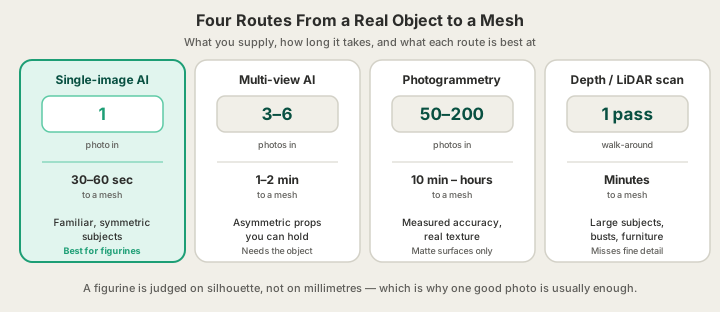
| Route | What you supply | Time to a mesh | Strongest at | Weakest at |
|---|---|---|---|---|
| Single-image AI | 1 photo | 30–60 sec | Familiar, roughly symmetric subjects | Invented back surfaces |
| Multi-view AI | 3–6 photos around the subject | 1–2 min | Asymmetric props, accurate silhouette | You must have the object in hand |
| Photogrammetry | 50–200 overlapping photos | 10 min – hours | Measured accuracy, real texture | Matte, feature-rich surfaces only |
| Depth / LiDAR scan | One slow walk-around pass | Minutes | Large subjects, busts, furniture | Small detail and thin features |
For figurines specifically, the single-image route usually wins, and not only because it is fast. A figurine is judged on silhouette and character, not on dimensional accuracy. Nobody puts calipers on a 90 mm statue of their dog. Photogrammetry's advantage — millimetre-true measurement — is spent on a property the finished object does not need, while its disadvantage — needing the physical subject and a hundred photos of it — rules out the most common request we see, which is a figurine made from a photo that already exists.
Pick the Height Before Anything Else
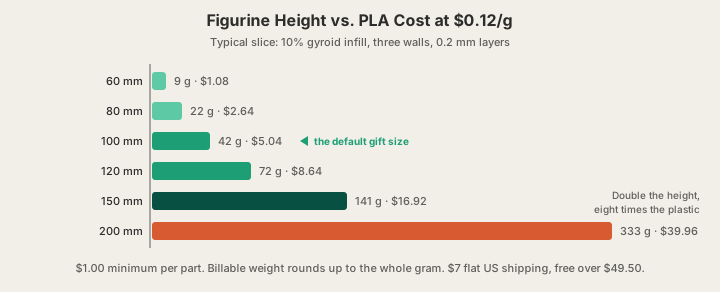
Height is the single decision that drives your bill, and it does not behave the way people expect. Printing is priced by weight — $0.12 per gram of PLA, all-in, covering filament and normal machine time together — and weight scales with the cube of height. Make a figurine twice as tall and it does not cost twice as much. It costs eight times as much.
| Height | Typical PLA weight | Price at $0.12/g | What it suits |
|---|---|---|---|
| 60 mm | 9 g | $1.08 | Keychains, desk miniatures, test prints |
| 80 mm | 22 g | $2.64 | Shelf figures, party favours, sets |
| 100 mm | 42 g | $5.04 | The default gift size |
| 120 mm | 72 g | $8.64 | Detail starts reading clearly at arm's length |
| 150 mm | 141 g | $16.92 | Centrepiece figure, visible facial detail |
| 200 mm | 333 g | $39.96 | Statement piece, trophy, display bust |
Those weights assume a normal figurine slice: 10% gyroid infill, three walls, 0.2 mm layers, which is roughly what our pipeline picks for a decorative piece. Your exact number comes from a real OrcaSlicer slice of your actual model rather than a volume guess, so a chunky seated bulldog and a thin standing heron of the same height will quote differently.
The upper bound is the machine, not the software. Our Bambu Lab H2S printers give a 340 × 320 × 340 mm build volume, so a figurine up to about 340 mm tall prints as one piece with no seams to hide. Past that you are splitting the model and bonding it, which is a perfectly good technique but a different project — How to Split a 3D Model for Printing Big Parts covers doing it without a visible joint. Note also that billable weight rounds up to the whole gram and there is a $1.00 minimum per part, which the 60 mm row above only just clears.
The Photo Decides the Figurine
Output quality tracks input quality almost one to one, and the failure modes are boringly consistent. One subject, filling the frame, on a plain contrasting background, in soft even light. That is most of it. A patterned couch behind your cat becomes couch geometry fused to the cat. A hard side-light shadow becomes a dent in the model, because the network reads shading as shape.
- Shoot at chest height for a person or pet, not from above — a downward angle compresses the subject and the model inherits the distortion.
- Get the whole silhouette in frame including feet or base; a cropped subject produces a cropped mesh.
- Avoid glass, chrome, and gloss. Reflections read as geometry that is not there, and the resulting surface warps.
- Prefer a subject with a defined outline against its background. Dark clothing against a dark room is the single most common bad input we see.
- Generate two or three variations before you commit. Regeneration is cheap; a reprint is not.
People and pets carry their own quirks. Hair and fur reconstruct as a smooth shell rather than strands, which reads fine at figurine scale and is what a hand-sculpted miniature would do anyway. Eyeglass frames, thin tails, and outstretched fingers are the risk areas — they sit right at the boundary of what both the AI and an FDM nozzle can resolve. The full shot list lives in Image to 3D Model: Turn Any Photo into a Real 3D Print.
From Mesh to Something a Nozzle Survives
A generated mesh is optimized to look right in a viewport, and viewports are forgiving in ways a printer is not. Raw AI output routinely contains holes that leave the slicer with no defined interior, non-manifold edges where three faces share one edge, and detail features thinner than a single 0.4 mm extrusion. None of that shows up in a render. All of it shows up on a build plate.
Our generator runs a server-side mesh review before you can check out, so a broken model gets caught while it is still a file. The six properties that matter — watertightness, manifold edges, wall thickness, overhang angle, shell count, and normal orientation — are laid out in Watertight Meshes: Six Checks for a Print-Ready Model. Sliced G-code you upload yourself gets a separate safety validation pass on the farm side before any machine executes it.
If you generated your figurine somewhere else, bring the file to /print directly. We accept STL, GLB and 3MF, including a plate you sliced yourself as .gcode.3mf. We do not accept OBJ — export STL or GLB from your tool instead, both of which every mainstream generator can produce. STL and GLB uploads cap at 100 MB, sliced files at 40 MB.
Colour: One Filament, or Up to Eight
A texture map does not print as it is. FDM colour comes from what is loaded in the machine, one solid filament per region, so you have three honest options, and the right one depends on how hard the colour boundaries are in your design.
| Approach | What you get | Cost effect |
|---|---|---|
| Single filament | One solid colour; all detail reads through shadow | Nothing added — the base $0.12/g rate |
| Single filament, then paint | Any finish you can brush, including gradients | Free at the farm, an evening at your desk |
| AMS colour split, up to 8 | Hard-edged colour regions, from a model generated in colour or a project we slice in its colours | Priced from that colour slice's measured grams and hours, plus $25 from five colours |
Our printers take up to eight colours in one job: one AMS holds four trays, and a second unit chained on adds four more for a flat $25 per order. There are two ways to get a figurine in colour. A model generated on /design can be sliced in its own colours: we read the colours off the model, split it by colour and slice it, and offer colour only when every colour really lays down plastic. Or paint it yourself in Bambu Studio or OrcaSlicer and upload the project .3mf on /print: we slice it plate by plate in the colours you assigned and price it from that slice. Bambu Studio Multi-Color Print Setup, Step by Step walks through the painting. The cost driver in multi-colour is not filament, it is the swap: every colour change purges the hot end, and every purge is plastic and time. A figurine with a two-colour base and body is cheap; a figurine that alternates colour every few layers up its whole height is not. 3D Printing Multiple Colors: Paint, Parts or Layer Swaps walks through the alternatives, including printing colour-separated parts and snapping them together.
What Happens After You Order
- Generate the model from your photo at /design and export STL, GLB, or 3MF.
- Upload it at /print. The quote comes from a real OrcaSlicer slice, so the grams you see are the grams you pay for.
- Pick material, layer height, and colour. Standard 0.2 mm layers price at 1×; premium 0.1 mm layers at 1.75× for finer facial detail.
- The job enters the farm queue in Austin, and an operator watches it on a live camera while it prints.
- Auto-eject clears the plate, the part is inspected, and it ships $7 flat anywhere in the US — free over $49.50.
Normal print ships in 4–5 business days, or 1–2 with Priority print ($5 at checkout). A 100 mm figurine is a few hours of machine time, so the queue, not the print, is usually the long pole. Bulk discounts apply if you are making a set: 5% off at five or more units, 10% at ten or more, which stacks neatly with the cube-law argument for going smaller.
FAQ
Can I turn a photo of a person into a figurine?
Yes, and it is the most common request. Use a straight-on, chest-height, full-body shot against a plain wall in soft light. Faces reconstruct convincingly at 100 mm and up; below about 80 mm, facial features start losing definition to layer height rather than to the AI. Print at 0.1 mm layers if the face is the point — it costs 1.75× the standard rate but roughly doubles the readable detail.
How much does a custom figurine from a photo cost?
At our all-in $0.12 per gram PLA rate, a 100 mm figurine runs about $5.04 and a 150 mm one about $16.92. There is a $1.00 minimum per part and $7 standard US shipping, free over $49.50, or $15 express. Generation itself is credit-based and new accounts start with free credits, so the first model usually costs nothing to make.
How big can a photo figurine be?
340 × 320 × 340 mm in one piece, which is the build volume of our Bambu Lab H2S machines. That is a substantial statue. Practically, cost is the real ceiling well before the printer is: at 340 mm a humanoid figurine is over a kilogram of PLA. Most people land between 100 and 150 mm.
Can I upload the OBJ my generator gave me?
No — OBJ is not an accepted upload format. Export STL, GLB, or 3MF instead; every mainstream AI generator offers at least one of them, and 3MF is the best pick because it carries the units and the colour data that STL throws away — the units matter to us, and the colour travels with the file, so a project painted in your slicer is sliced in those colours. We also accept a sliced plate (.gcode.3mf) if you prepared the file yourself.
Ready to get started?
Upload a 3D model for instant pricing, or generate one with AI.