Bambu Print Farm Operator: A Day in the Life
A Bambu print farm operator spends almost no time printing. The day is a loop of clearing finished plates, putting the right filament in front of the right job, deciding which prints a machine is allowed to finish unsupervised, and getting boxes to a carrier before the last pickup. The printing itself happens in the gaps. Here is what a real day looks like on our Austin farm, a fleet of Bambu Lab H2S and P2S machines, roughly hour by hour, including the handful of moments where a human still has to make the call.
Running a Bambu Print Farm in One Sentence: Keep Plates Empty
A printer with a finished part still sitting on its bed is a printer producing nothing. That single fact organises everything else. Throughput on a farm is not set by how fast the machines move, because they all move at roughly the same speed; it is set by how many minutes each machine spends occupied by work that is already done. An operator's real product is empty plates, and every routine below exists to produce them. /docs/farm/overview describes the machines and which steps are a person rather than a program.
The second thing that organises the day is that mistakes are cheap in the morning and expensive at night. A wrong filament caught at 08:00 costs a spool swap. The same mistake caught at 23:00 costs a full plate of parts in the wrong colour and a reprint that pushes an order past its ship date. So the day front-loads every decision it can, and ends with a deliberately conservative set of choices about what runs unattended.
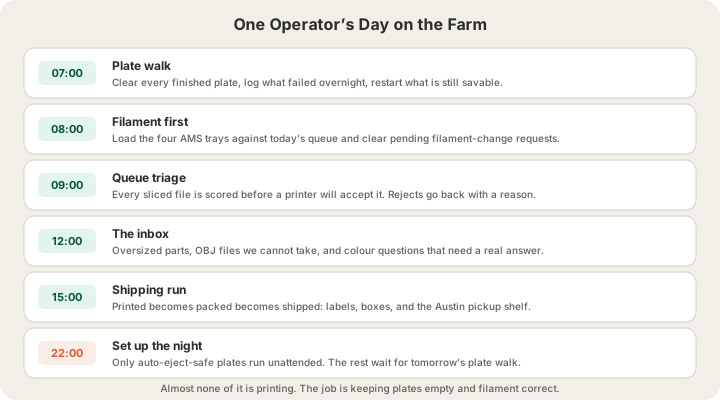
07:00 — The Plate Walk
The first thirty minutes are a walk down the row with a scraper and a tablet. Every machine gets the same three questions: is there a part on the bed, did it come out, and can this printer take the next job. Plates that ran overnight and passed their auto-eject checks are already clear and mid-print again. Everything else is waiting for hands.
Failures get logged in the moment rather than at the end of the day, because the useful information is perishable. A part that lifted at one corner tells you the bed needs a wash; a part that turned into spaghetti at layer 40 tells you something else entirely, and by lunchtime nobody remembers which machine it was. The re-queue itself is the easy part: the file, the material and the order manifest are all still on the system, so a failed print goes back into the queue in seconds and usually reprints the same morning.
This is the concrete version of the redundancy argument in What Is a 3D Print Farm? How Ours Runs in Austin. A hobbyist whose print fails at 3 a.m. loses a night. A farm loses a plate, because there are other machines and the job simply moves.
08:00 — Filament Before Anything Else
Every machine carries a four-tray AMS, and what is in those four trays decides which jobs the machine can accept for the rest of the day. Queueing a job asks which filament as an explicit step, for every job and not only the multi-colour ones, which sounds fussy until you have printed a perfect part in the wrong shade of grey. Colour is a decision somebody makes on purpose, at the start, in writing.
Requests pile up overnight and get cleared in one pass. There are three kinds, and they behave differently:
| Request | Raised when | What it blocks | How it clears |
|---|---|---|---|
| Bed clean | A plate needs lifting by hand or a bed needs a wash | That printer's next job | Operator clears it and nudges the machine back to idle |
| Filament change | A queued job needs a colour that is not loaded | Any job start on that printer | Operator loads the spool and marks it done |
| Filament stock | A colour or material is not in the catalogue at all | Nothing today — it is a purchasing decision | Approved, ordered, added to the catalogue |
The filament-change lock is the interesting one. While a change is pending, the job control route refuses to start anything on that printer. It is a small piece of software that exists entirely to stop a human from doing something reasonable and wrong: walking past a machine that is idle, seeing a queued job, and pressing start before the spool that job needs has been loaded.
09:00 — Queue Triage
By mid-morning the overnight orders are through pricing and sitting in the queue. G-code is a program, and a farm that runs arbitrary programs on machines heating past 250 °C is a farm waiting for an incident, so every sliced file is parsed and scored from 0 to 100 before a printer is allowed to accept it. Emergency stops, disabled endstops, factory resets and rewritten PID values are rejected outright. Settings writes and board restarts are flagged for a person to look at, which in practice means the operator.
Alongside the scan, the operator is doing the judgement calls the scoring cannot make:
- Does this file's declared printer model and plate footprint match the machine it is heading to — a file sliced for a smaller bed does not silently go to a bigger one
- Is this part oriented sensibly for the load it will see, or has someone laid a bracket flat so it snaps along the layer lines
- Did the customer write a note at checkout, and does the note change anything about how the job should be set up
- Is this a repeat of a job that already failed once, and if so, what is different this time
None of that requires reading the whole file. It requires knowing what to look at. The full validation pipeline, from mesh check through OrcaSlicer quote to the safety score, is written up in 3D Printing Process: What Happens After You Click Print; the operator's job is the thin layer of human judgement on top of it.
The Decision That Sets Up the Night: Auto-Eject
The single highest-leverage call an operator makes is which plates are allowed to eject themselves. A plate that clears automatically lets the printer start the next job unattended, which is how a farm turns eight working hours into twenty-four productive ones. A plate that gets pushed off when it should not have been is a scrapped part and, if it lands badly, a jammed machine that produces nothing until morning.
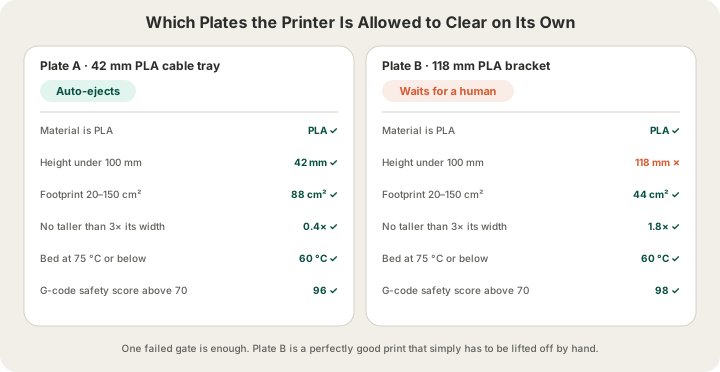
| Gate | Limit | What it is protecting against |
|---|---|---|
| Material | PLA only | Warp-prone materials that grip the plate unpredictably |
| Height | Under 100 mm | Tall parts tip instead of sliding |
| Footprint | 20–150 cm² | Too small to push reliably, or too big to clear the plate |
| Aspect ratio | No taller than 3× its width | Slender parts topple even when they are short |
| Bed temperature | 75 °C or below | A hot plate still holds the part when the push comes |
| Safety score | Above 70 | A file nobody has vouched for should not run unattended |
The gates are deliberately conservative, and plenty of perfectly good prints fail them. A 118 mm bracket in PLA on a 60 °C bed with a clean file fails on height alone, which is the right answer: the cost of being wrong is asymmetric. Parts that fail the check simply wait, and get lifted off during the next plate walk.
12:00 — The Inbox Is Part of the Machine
Midday is customer work, and the same four conversations come round every week. Somebody sent an OBJ, which we do not accept, and needs to be told which formats do work and that the conversion takes seconds. Somebody's model is 400 mm on its long axis and will not fit the 340 × 320 × 340 mm plate, so it needs splitting or scaling. Somebody wants to know why their two-colour nameplate quoted higher than the single-colour version, and the honest answer is that every filament change flushes the nozzle and that purge is filament they are paying for.
The fourth is the price question, and it is the easiest one because the pricing is deliberately boring. PLA is $0.12 per gram, all-in, filament and normal machine time together, with billable weight rounded up to the whole gram and a $1.00 minimum per part. Standard 0.2 mm layers are 1×; premium 0.1 mm layers bill at 1.75× the rate because they take most of a night rather than an afternoon. Shipping is $7 flat anywhere in the US and free over $49.50, or $15 express. That whole answer fits in a paragraph, which is the point — a quote nobody can explain is a quote nobody trusts.
15:00 — The Shipping Run
Afternoon is the one genuinely repetitive block, and the one where a farm most resembles a warehouse. Parts that came off the plate this morning have cooled, been checked and been packed; the run turns packed into shipped. Labels get bought, boxes get sealed, and the occasional order we agreed to hand over in person goes to the pickup shelf instead of into a box.
Customers see five stages on their order — placed, printed, packed, shipped, delivered — and only three of them send an email. Packed is an internal milestone, and placed is already covered by the receipt. A notification the customer cannot act on is just noise, and a farm that emails five times per order trains people to ignore the one message that mattered.
Overnight
After the last human leaves, the farm keeps running on the decisions already made. Auto-eject-safe plates clear themselves and pull the next job. Live camera streams cover the beds, so a failure at 3 a.m. is something you can see rather than something you discover at 08:00. Nobody watches those streams all night — the point is that the evidence exists in the morning, which turns a mystery into a diagnosis.
This is also where the maths of a farm shows up. Queue time, not print time, is where most of a customer's calendar goes, and unattended hours are the cheapest way to shorten a queue. How Long Does 3D Printing Take? Real Times From a Print Farm breaks that down; from the operator's chair it is simply the reason the 22:00 routine matters more than the 09:00 one.
What Actually Goes Wrong
Very little of the trouble on a farm is dramatic. The recurring problems are mundane and mostly logistical:
- A spool runs out mid-plate, and the AMS switches to a tray holding a slightly different shade of the same colour
- A bed needs washing and nobody logged it, so three prints in a row lift at the same corner
- A tall part passes every check a human would apply and still tips during eject, because a human would have looked at it and hesitated
- An AMS throws a feed or humidity error and quietly stops accepting the tray a queued job needs — Bambu AMS Filament Stuck? Multi-Color Errors Decoded covers what each one means
- A customer replies to the confirmation email with a change of colour after the job has already started
The pattern is that almost none of it is about printing. It is inventory, scheduling and communication, which is what people mean when they say a print farm is a manufacturing business rather than a 3D printing hobby with more machines. If you want to see the machine side of it from the outside, the live fleet and lead times are on /farm.
FAQ
How many printers can one operator run?
It depends almost entirely on how many plates clear themselves. An operator handling every eject by hand is limited by walking distance and attention. Once auto-eject, queue software and camera coverage are in place, the binding constraint stops being the machine count and becomes the awkward jobs: tall parts, unusual materials, and anything needing a filament the AMS is not holding.
What does a print farm operator actually do all day?
Clears finished plates, loads and swaps filament, triages the queue and the sliced files in it, answers customer questions about files and prices, packs and ships, and decides each evening which plates are safe to run unattended. The printers do the printing.
Do you watch the cameras all night?
No. The streams exist so that a failure has a record, not so that somebody stares at them. In the morning the difference between a print that lifted at layer 3 and one that came loose at layer 300 is the difference between washing a bed and re-checking a model, and you cannot tell them apart from the pile of plastic alone.
Can I visit or pick up in Austin?
Not as a walk-in. Every order placed at /print is shipped; pickup is not a checkout option. If collecting in Austin matters for a particular order, ask at /contact before you place it and we will tell you whether it can be arranged.
Ready to get started?
Upload a 3D model for instant pricing, or generate one with AI.