STL vs OBJ vs 3MF vs STEP: 3D Export Formats Explained
The format you choose when exporting a 3D model determines whether your print comes out with sharp edges or faceted curves, whether color data survives the handoff, and whether your service bureau can even open the file. STL, OBJ, 3MF, and STEP each solve different problems — choose the wrong one and you lose geometry, color, or scale before the first layer ever prints.
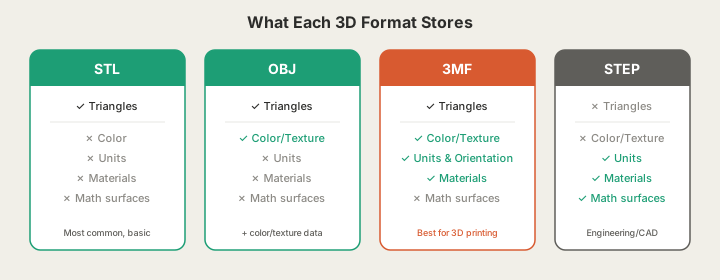
What Each Format Actually Stores
STL — The Universal Baseline
STL encodes geometry as a mesh of triangles — nothing else. No color, no material, no scale units. Every slicer reads STL without question, but curved surfaces become faceted polygons. The more triangles, the smoother — and the larger the file.
OBJ — Geometry Plus Color
OBJ adds support for vertex colors, UV-mapped textures, and material libraries (.mtl files). The catch: color splits into a companion .mtl file. Send the .obj without the .mtl and the color is gone.
3MF — Built for Manufacturing
3MF packages geometry, color, material assignments, scale units, build orientation, and support hints into a single compressed container. Because it defines units explicitly (millimeters), you eliminate the unit-ambiguity problem that causes STL files to arrive 25.4x too large or too small.
STEP — Parametric Precision
STEP stores geometry as mathematical surfaces — NURBS, B-splines, analytical cylinders — not triangle approximations. A sphere is an exact sphere. A drilled hole is a mathematically precise cylinder. Preferred for mechanical parts where tolerances matter.
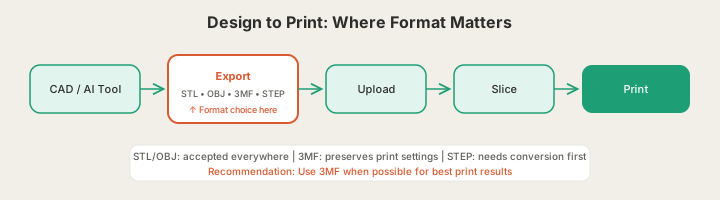
Format Comparison at a Glance
| Feature | STL | OBJ | 3MF | STEP |
|---|---|---|---|---|
| Universal slicer support | Yes | Partial | Yes (modern) | Partial |
| Stores color / texture | No | Yes (+ .mtl) | Yes (built-in) | No |
| Explicit scale units | No | No | Yes (mm) | Yes |
| Build orientation hints | No | No | Yes | No |
| Parametric/exact geometry | No | No | No | Yes |
| File size (typical) | Medium | Medium | Small (compressed) | Medium |
| Best for | Compatibility | Color/texture | Modern FDM/SLA | Engineering |
Which Format to Use: Decision Guide
| Your situation | Recommended format |
|---|---|
| Uploading to any print service for the first time | STL (safest) |
| Full-color or multi-material print | 3MF |
| AI-generated model from X3D /design | 3MF or STL |
| Mechanical part from CAD | STEP |
| Photogrammetry/scanned object with texture | OBJ (zip with .mtl) |
| Slicer project to reopen later | 3MF |
Common Mistakes
- Ignoring units on STL — if CAD exported inches and slicer assumes mm, model arrives 25.4x wrong size
- Uploading OBJ without the .mtl — color data is lost
- Using STL for high-tolerance parts — triangle approximation introduces measurable error on curves
- Treating format as a printability guarantee — a valid 3MF can still contain non-printable geometry
FAQ
Is 3MF better than STL for 3D printing?
For most modern workflows, yes. 3MF stores explicit units, build orientation, and material data in a single file, eliminating several common print errors. STL remains necessary for older software.
Why does my STL arrive at the wrong scale?
STL stores no units. The exporter may have assumed inches while the slicer assumed millimeters, producing a 25.4x size discrepancy. Fix by scaling in the slicer or re-exporting.
What format for AI-generated 3D models?
3MF is best when available — it carries units and orientation. STL works for universal compatibility. STEP doesn't apply to AI-generated models since they're meshes, not parametric geometry.
Ready to get started?
Upload a 3D model for instant pricing, or generate one with AI.